

What is Zero Trust Network Access (ZTNA)?
 Aaron Crawfis |
How Organizations Traditionally Secured Remote Access
For decades, enterprise security was about building a strong perimeter, trusting everyone inside it, and keeping the bad guys out. Put up a firewall. Give employees a VPN. Done. This model worked reasonably well when every employee worked in the office on corporate-managed machines, and all your applications lived in an on-premises data center.
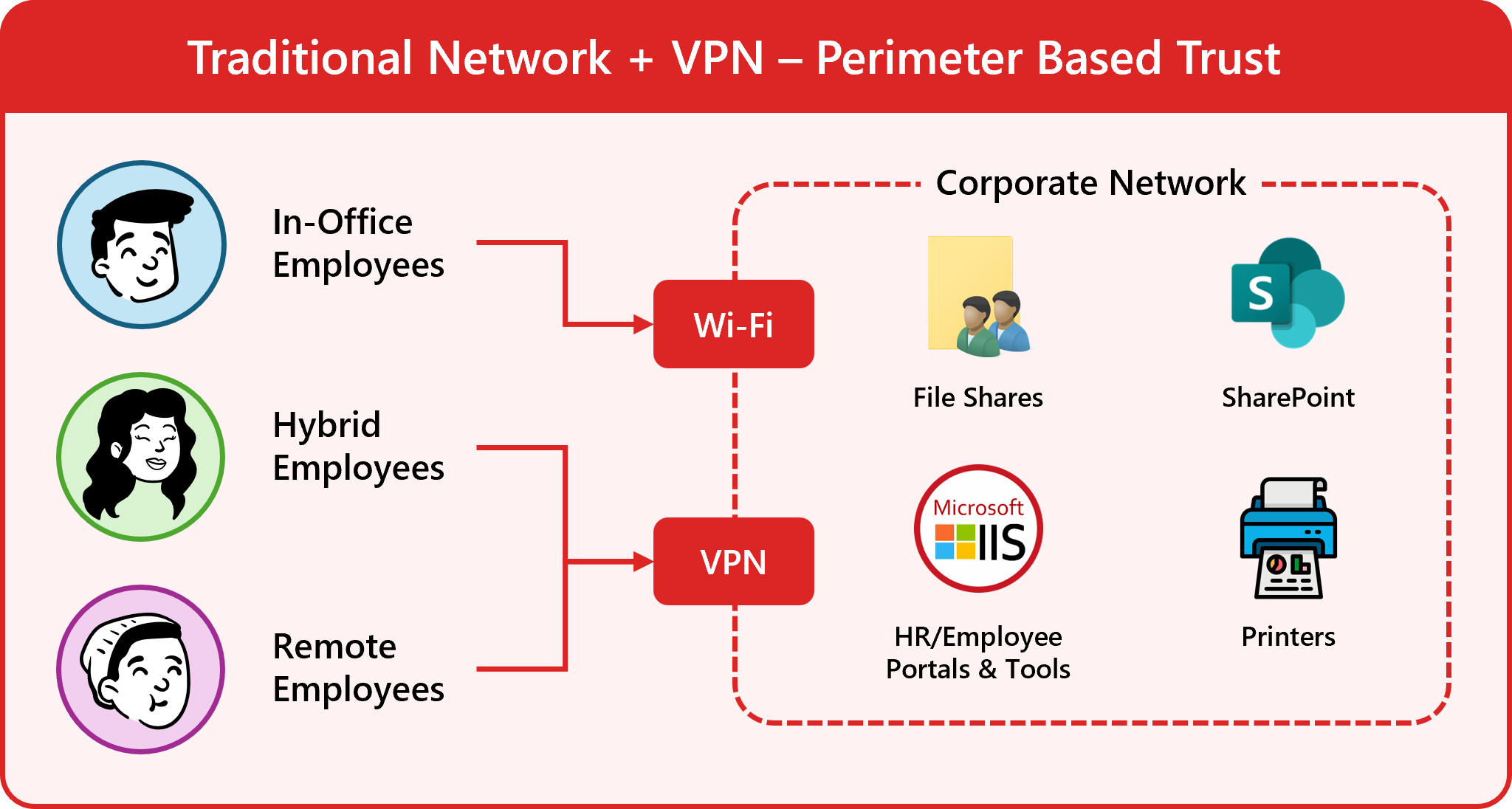
For most organizations today, that model is no longer enough to protect against modern threats. The perimeter has dissolved, and the attack surface has exploded.
Today, users access applications from home, coffee shops, and hotel rooms. Applications run in Azure, AWS, SaaS platforms, and on-premises simultaneously. Attackers have figured out that if they can compromise a single VPN credential, they often get broad access to everything behind it, as everything on the internal network is implicitly trusted.
Zero-Trust Network Access: The Future of Secure Remote Access
Zero Trust Network Access (ZTNA) is the architectural response to this reality. Instead of trusting a user based on where they are connecting from (the network), ZTNA continuously verifies who they are, what device they are on, and what they are allowed to access. This verification happens for every single request, every single time. Access is granted only to the specific application the user needs, not the entire network.
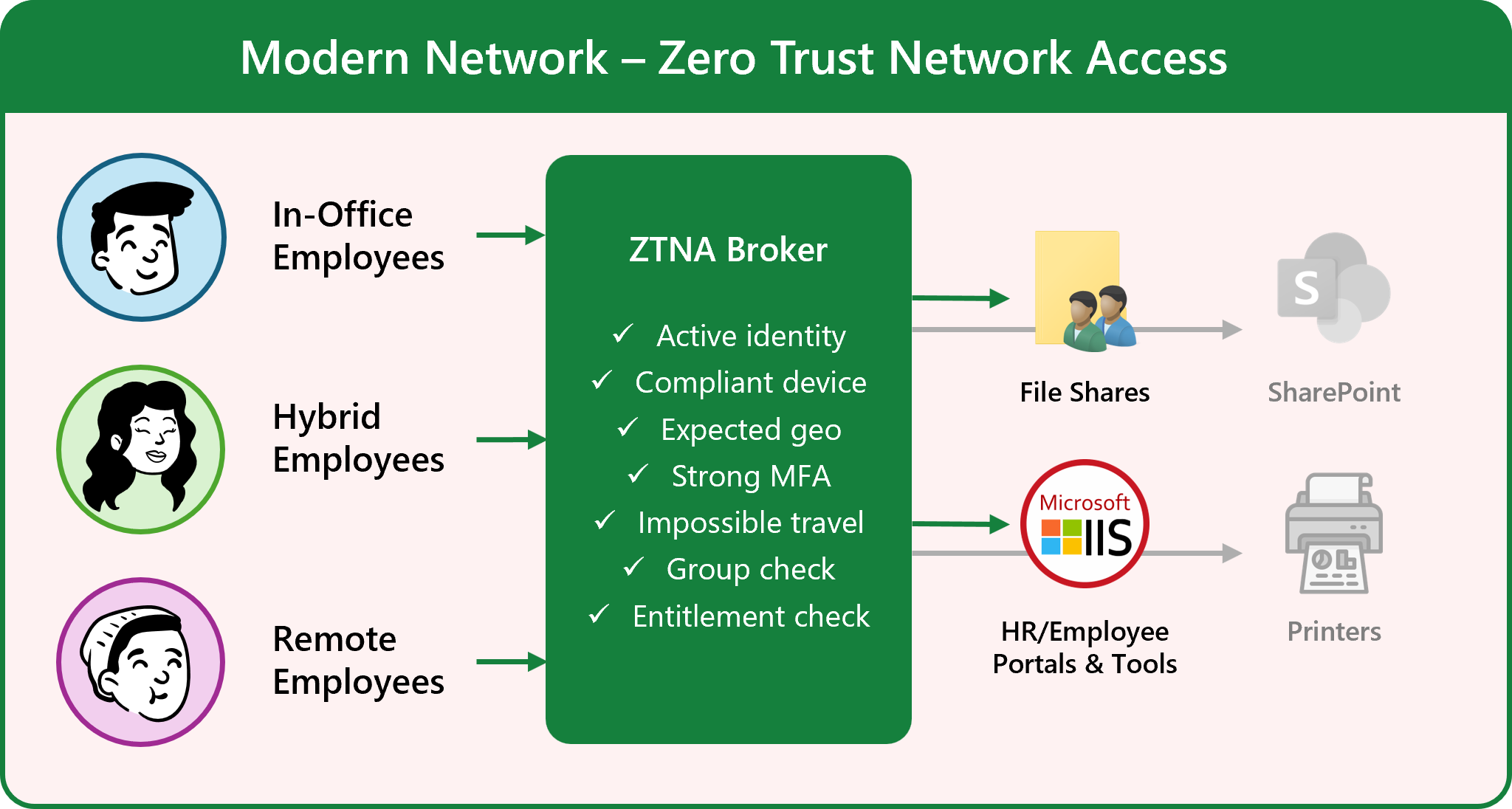
Instead of implicitly trusting users once they are on the network, ZTNA enforces a strict never trust, always verify model. This significantly reduces the attack surface and limits the blast radius of any potential compromise.
The Problem with Traditional VPNs
To understand why ZTNA matters, it helps to understand what it is replacing and why VPNs are no longer sufficient for modern organizations.
The Castle-and-Moat Model
Traditional VPNs operate on what security professionals call the castle-and-moat model. The castle is your corporate network, and the moat is your firewall and perimeter controls. A VPN creates a tunnel through the moat, placing a remote user inside the castle walls. Once inside, that user is largely trusted to move around freely.
This model has two fundamental problems:
-
It grants network-level access, not application-level access. A user connecting via VPN often gets access to a large subnet of internal resources, not just the one application they need to do their job. If an attacker steals that user’s VPN credentials, they inherit the same broad access.
-
It relies entirely on the initial authentication event. Once a VPN session is established, the connection is trusted for its duration. There is no continuous evaluation of whether the device has been compromised mid-session, whether the user’s behavior looks anomalous, or whether access should be revoked.
VPNs Are Not Built for the Cloud Era
Beyond the security model issues, VPNs create real operational and performance problems:
- Hairpinning traffic: When a user in Seattle needs to reach a SaaS application (such as Salesforce or Microsoft 365), their traffic can often route through the main office’s corporate data center on the East Coast before reaching the internet. This adds unnecessary latency and worsens the user experience.
- Scalability challenges: VPN concentrators must be sized for peak load, and sudden spikes in remote workers (as organizations discovered in 2020) can overwhelm them.
- Lateral movement risk: Once inside the network perimeter, a compromised account or device can move laterally to other systems, escalating a small breach into a catastrophic one. File shares, internal web applications, and legacy systems are all vulnerable to this kind of attack.
- Split tunneling trade-offs: Organizations are forced to choose between routing all traffic through VPN (slow, expensive) or allowing split tunneling (which reduces security visibility).
ZTNA addresses all of these problems by flipping the model entirely.
How ZTNA Works
ZTNA operates at the application and identity layers rather than the network layer. Instead of giving a user access to the network and letting them reach applications from there, ZTNA brokers access directly to specific applications based on a continuous, context-aware policy evaluation.
Here’s a typical ZTNA flow:
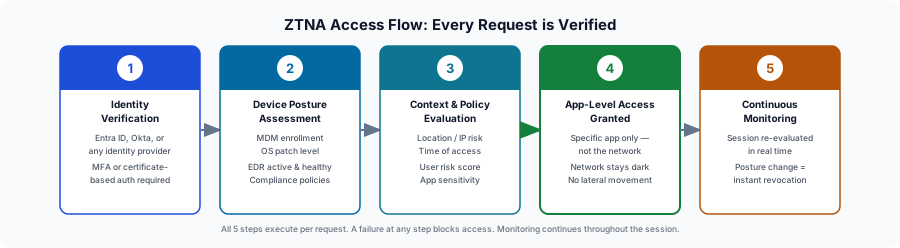
Step 1: Identity Verification
When a user requests access to an application, ZTNA first verifies their identity through your identity provider (_Microsoft Entra ID, Okta, etc.). This typically involves multi-factor authentication (MFA) or certificate-based authentication (CBA) to ensure the credential has not been phished or stolen.
Strong ZTNA implementations favor phishing-resistant MFA (hardware security keys or certificate-based authentication) over SMS-based MFA, which is vulnerable to SIM swapping and social engineering attacks.
Step 2: Device Posture Assessment
Identity alone is not enough. ZTNA checks the health and compliance posture of the device before granting access. This includes:
- Is the device managed by the organization (via Microsoft Intune, Jamf, or another MDM)?
- Is the operating system up to date with security patches?
- Is endpoint detection and response (EDR) software installed and active?
- Does the device meet the organization’s defined compliance policies?
A user with valid credentials attempting to connect from an unmanaged personal device can be denied access, or granted only limited access to low-sensitivity applications.
Step 3: Context and Policy Evaluation
Beyond identity and device, ZTNA evaluates additional contextual signals:
- Location: Is the user connecting from an expected geographic region? Is this an anomalous location compared to their normal patterns?
- Time of access: Is this request happening at an unusual hour?
- Risk score: Has the identity provider flagged this session as elevated risk based on behavior analytics?
- Application sensitivity: Is the requested application classified as high, medium, or low sensitivity?
All of these signals are evaluated against a policy engine to make an access decision.
Step 4: Application-Specific Access is Granted
If the policy engine approves the request, the user receives access only to the specific application they requested, not the underlying network. The application itself may be running in Azure, in an on-premises data center, or in a SaaS environment. The user never needs a routable network path to it; the ZTNA broker handles the connection on their behalf.
Critically, the internal network and infrastructure remain dark to the user. They cannot see or scan other internal resources. Lateral movement is eliminated by design.
Step 5: Continuous Session Monitoring
ZTNA does not trust and forget. Throughout the session, the ZTNA solution continuously re-evaluates the connection. If the device posture changes mid-session (if the EDR software is disabled, or the device fails a compliance check), access can be revoked in real time without waiting for a new login event.
ZTNA vs. VPN: A Direct Comparison
| Traditional VPN | ZTNA | |
|---|---|---|
| Access scope | Network-level (broad) | Application-level (specific) |
| Trust model | Implicit after authentication | Continuous verification |
| Lateral movement | Possible | Eliminated |
| User experience | Often slow, requires client setup | Fast, seamless, often clientless |
| Cloud application support | Poor (hairpinning) | Excellent (direct-to-cloud) |
| Device posture checks | Limited | Continuous |
| Scalability | Hardware-constrained | Cloud-elastic |
| Zero Trust alignment | Minimal | By design |
Two Deployment Models: Agent-Based vs. Service-Initiated ZTNA
There are two primary ways ZTNA solutions are deployed, and the right choice depends on your environment and use case.
Agent-Based ZTNA
In the agent-based model, a lightweight software agent is installed on the user’s device. This agent handles identity verification, device posture assessment, and the encrypted connection to the ZTNA service. The agent is the conduit through which all application access flows.
Popular ZTNA solutions like Microsoft Entra Private Access and Zscaler Private Access use this model. The agent can enforce policies at the endpoint, providing rich telemetry and control.
Best for: Managed corporate devices where you have control over software installation. Provides the richest device posture data and the most granular policy enforcement.
Service-Initiated (Agentless / Reverse Proxy) ZTNA
In the service-initiated model, there is no agent on the user’s device. Instead, a connector is deployed near the application (in your data center or cloud environment), and users access applications through a web browser via a reverse proxy. Authentication happens at the proxy layer before any traffic reaches the application.
Best for: Third-party contractors, vendors, or BYOD scenarios where installing an agent on the endpoint is impractical. Also useful for rapid onboarding of new applications without requiring agent rollouts.
Examples of this model include Cloudflare Access, Microsoft Defender for Cloud Apps, and Akamai Enterprise Application Access. While this model may not provide as rich device posture data as an agent-based solution, it still enforces strong identity-based access control at the application layer.
Many enterprise ZTNA deployments use both models: agent-based access for managed employees, and agentless access for contractors and external partners.
Common ZTNA Use Cases
Organizations of all sizes and industries are adopting ZTNA to solve a variety of security challenges. Here are some of the most common use cases:
Secure Remote Workforce Access Using ZTNA
The most common driver for ZTNA adoption is replacing or augmenting VPN for remote employees. Organizations that struggled with VPN performance, scalability, and security during the shift to remote work found ZTNA to be a more resilient and scalable solution.
For workers accessing cloud applications across the country or around the world, ZTNA’s direct-to-cloud architecture provides a much better user experience than sending traffic through a central data center. At the same time, the application-level access and continuous verification significantly reduce the risk of credential compromise leading to a full network breach.
ZTNA for Third-Party and Vendor Access
Giving contractors and vendors VPN access is inherently risky. They get broad network access on unmanaged devices, and you have limited visibility and control. ZTNA’s agentless model allows third parties to access only the specific applications they need, from a browser, with no access to the underlying network or requirement to install software on their device. This is a huge security win for organizations that rely on external partners.
Protect Mergers and Acquisitions With ZTNA
During M&A activity, connecting two organizations’ networks creates enormous security risk. ZTNA allows the acquiring company to grant employees of the acquired company access to specific applications without network-level connectivity between the two environments, dramatically reducing integration risk.
No more rushing to implement network segmentation or firewall rules to isolate the new environment. ZTNA provides a secure, identity-based bridge to critical applications while the full integration process unfolds.
Locking Down Multi-Cloud and Hybrid Environments With ZTNA
Applications spread across Azure, AWS, GCP, and on-premises data centers are difficult to secure with traditional perimeter tools. ZTNA treats all application locations equally, enforcing consistent access policies regardless of where the application runs.
Employees can access the applications they need without worrying about where they are hosted, while security teams maintain control and visibility across the entire multi-cloud environment.
ZTNA for Privileged Access to Critical Systems
For engineering teams and administrators accessing production infrastructure, ZTNA integrates naturally with just-in-time (JIT) access models. An engineer can request time-bound, application-specific access to a production system with a full audit trail, without ever receiving standing network access.
Getting Started with ZTNA
Implementing ZTNA is a journey, not a switch you flip overnight. Here is a practical starting framework:
Step 1. Start with Identity. Before ZTNA can enforce access policy, you need strong identity hygiene. That means getting all users onto phishing-resistant MFA or certificate-based authentication, ensuring your identity provider is the authoritative source of truth for all access decisions, and cleaning up stale accounts and over-privileged roles. Keytos’ passwordless onboarding solution, EZCMS, can help you get all users onto strong, phishing-resistant credentials which can easily be managed on Windows, macOS, and Linux devices.
Go Passwordless with EZCMSStep 2. Inventory Your Applications. Map out which applications your users need access to, where they run (on-premises, Azure, SaaS), and how sensitive they are. This inventory becomes the foundation for your ZTNA policy design.
Step 3. Define Access Policies. For each application, define who should be able to access it, from what types of devices, under what conditions. Start with your highest-sensitivity applications where the risk of over-permissive access is greatest. Where possible, leverage just-in-time access using tools like Microsoft Privileged Identity Management or Keytos EZSSH to minimize standing access across your resources.
Protect Your Endpoints and Repositories with Keytos EZSSHStep 4. Pilot with a Low-Risk Use Case. A common starting point is deploying ZTNA for third-party contractor access. Contractors typically access only a small number of applications and currently receive broader VPN access than they need. Replacing that with application-specific ZTNA access is a low-disruption way to build operational familiarity with the platform.
Step 5. Expand and Mature. Once the pilot is stable, expand ZTNA to additional user populations and applications. Over time, retire VPN access for user groups that have been fully migrated to ZTNA, and use the access logs to continuously refine your policies.
ZTNA Is the Foundation of Modern Network Security
The shift from perimeter-based security to identity-based, application-level access control is not a trend, it is the direction the entire industry has been moving for over a decade, accelerated by the mass adoption of cloud applications and remote work. ZTNA operationalizes that shift in a concrete, deployable way.
Organizations that have made the transition to ZTNA report not just better security outcomes, but often better user experiences and reduced operational complexity compared to managing aging VPN infrastructure. The key is approaching the implementation thoughtfully: starting with a strong identity foundation, mapping your applications, and expanding methodically.
At Keytos, identity security is the core of everything we build. Whether you are at the beginning of your Zero Trust journey or looking to strengthen the identity pillar that underpins your ZTNA deployment, our team of identity and PKI experts can help. Schedule a call with our security experts to discuss how certificate-based authentication, passwordless identity, and strong device posture can accelerate your ZTNA implementation.
Schedule a Call with Our Identity Experts