

We Cut Our Azure Bill by 30% During Our Month of Engineering Excellence
 Igal Flegmann |
At Keytos, every quarter our engineering team dedicates an entire month to what we call the “Month of Engineering Excellence.” This focused period allows us to step back from our regular development cycles and concentrate on optimizing our infrastructure, refining processes, and enhancing system performance. While it might sound dumb to stop building new features for a whole month, the benefits we reap from this dedicated time allow us to move faster and more efficiently while maintaining our high quality.
In this past Month of Engineering Excellence (which ended up being more like two months but they were worth it), we had a few tasks lined up such as improving our CI/CD pipelines (reduced build times by 50+% by creating our own build images with all the pre-requisites installed Sorry GitHub), improving our monitoring and alerting systems, and other boring things that I am not going to bore you with. However, there were two major tasks that we did that had a dramatic impact on our infrastructure costs and overall system performance.
Task 1: Moving Database Systems for EZMonitor and Implementing Caching
The first task I want to highlight is our decision to move the database systems for our EZMonitor product. If you are not familiar with it, EZMonitor is our cloud-based X.509 certificate monitoring solution that helps organizations track and manage their digital certificates. How do we do it? We scan the certificate transparency logs and save each one certificate that is issued.
Yes you read that right, we store every public certificate that is issued in the world in our database. This allows us to provide our customers with real-time monitoring and alerts for any certificate that is relevant to their domains. As you can imagine, this results in a massive amount of data being stored and processed. As ex-Microsoft engineers, when we think of large-scale databases we immediately think of Azure Data Explorer (ADX), formerly known as Kusto. ADX is a highly scalable and performant database solution that is optimized for large-scale data analytics and querying. It is the backbone of many Microsoft services, including Azure Monitor and Application Insights. The one thing we forgot to consider, is that we are no longer at Microsoft and ADX comes with a hefty price tag.
Implementing Caching to Reduce Database Load and Improve Performance
Once we started looking into our ADX costs, we realized that a lot of our costs were coming from querying all the certificates for our customers every single day to check for any new certificates that were issued, are there any certificates that are about to expire, or any mis-issuance events. Each of these queries would scan through billions of records in ADX including many records that were stored in cold storage, which is significantly more expensive to query. To address this, we implemented a caching layer using Azure SQL Database to store the results of “old” certificates that we query frequently, allowing us to modify our ADX queries to only look for “new” certificates that were issued since the last time we queried ADX (meaning that we will now only hit cold storage once per customer). This change alone reduced our ADX CPU from constantly running at 80-90% utilization to now running at a steady 10-15% utilization, and our storage costs have dropped significantly as well.
Migrating from Cosmos DB to Azure SQL Database
Once we implemented the caching layer, and saw our EZMonitor costs drop by around 50%, we took a look at the Cosomos DB that did all the data storage for the rest of the application. Cosmos DB is a great NoSQL database solution that is highly scalable and performant. When you are starting out with a new application it is relative inexpensive. However, as your data grows the costs can quickly add up, especially when you are dealing with large volumes of data and high throughput requirements. Last year we migrated EZCA away from Cosmos DB to Azure SQL Database and saw significant (87%) cost savings, so now it was EZMonitor’s turn. After evaluating our options, we decided to migrate from Cosmos DB to Azure SQL Database as the main data storage of EZMonitor. This migration was not as simple as it sounds, moving from a NoSQL database to a relational database requires significant changes to the application architecture and data modeling. However, the cost savings were worth the effort. After completing the migration, we saw a total 83% reduction in our overall EZMonitor infrastructure costs.
Task 2: Moving to .NET 10
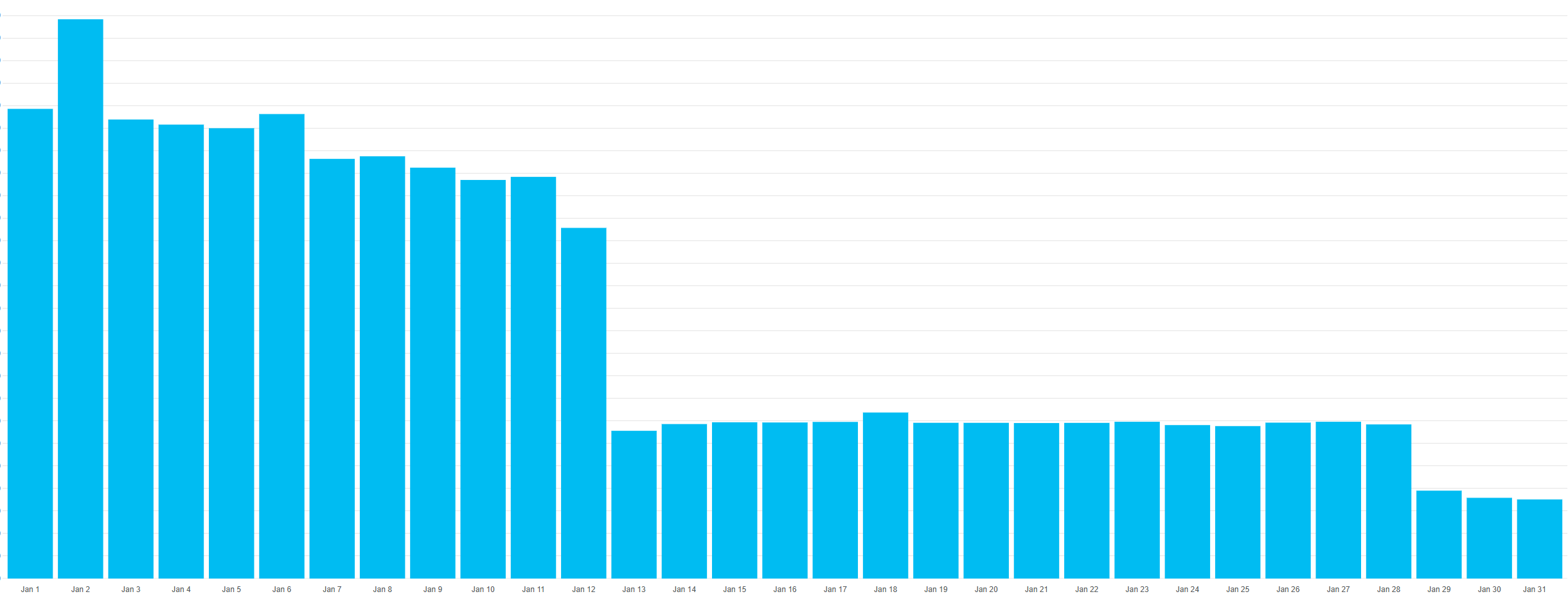
While the first task was a super-sexy-code-heavy-a-lot-of-work-task, the second one was a lot easier but still had a significant impact on our infrastructure costs. As you may know, we build all our services using .NET, and with the recent release of .NET 10, we decided to take advantage of the new features and performance improvements that come with it. One of the key features of .NET 10 is its improved performance and reduced memory footprint, which translates to lower infrastructure costs when running our applications in the cloud. So by just upgrading our applications to .NET 10 (which took around a day), we were able to reduce our CPU and memory usage by up to 50%; so if your manager is still debating wether to upgrade to .NET 10 show them this post (also previous .NET versions will be EOL soon so make sure to update).
Below is the graph for memory usage before and after the upgrade to .NET 10 for one of our services, as you can see there is a significant drop in memory (sorry forgot to show CPU graph but it was 1/3 of the original CPU usage).

Wait Your Math is Not Mathing
So if you are paying attention you might be wondering how we got to a total of 30% cost savings when just the EZMonitor changes alone saved us over 87% on that product and that database is massive. The answer is that while EZMonitor is a significant part of our infrastructure costs and all our services run on .NET 10, we are also growing rapidly and we decided to not scale-in our infrastructure just to have to scale it back out again weeks later. So our real cost savings will kick for every VM we don’t need to run and every scale-out we don’t need to run in the future.
In the end, every dollar we save on infrastructure costs is a dollar that we can invest back into building new features and improving our products for our customers.
Find This Interesting? Join Us!
If you are reading this for fun, you are our type of weird! Apply to join our engineering team and help us build the future of cloud security!