








How to Add a Local RADIUS Proxy to EZRADIUS Cloud RADIUS for Redundancy
 Keytos Team |
Overview - What is a Local RADIUS Proxy and Why Would I Need One?
While EZRADIUS Cloud RADIUS runs as a highly available service in the cloud with zonal and regional redundancy built-in, that doesn’t help when your internet goes down and you can’t reach EZRADIUS when authenticating to your network, or if you have a remote site with high latency to the nearest EZRADIUS region (e.g. rural areas, satellite internet, etc.).
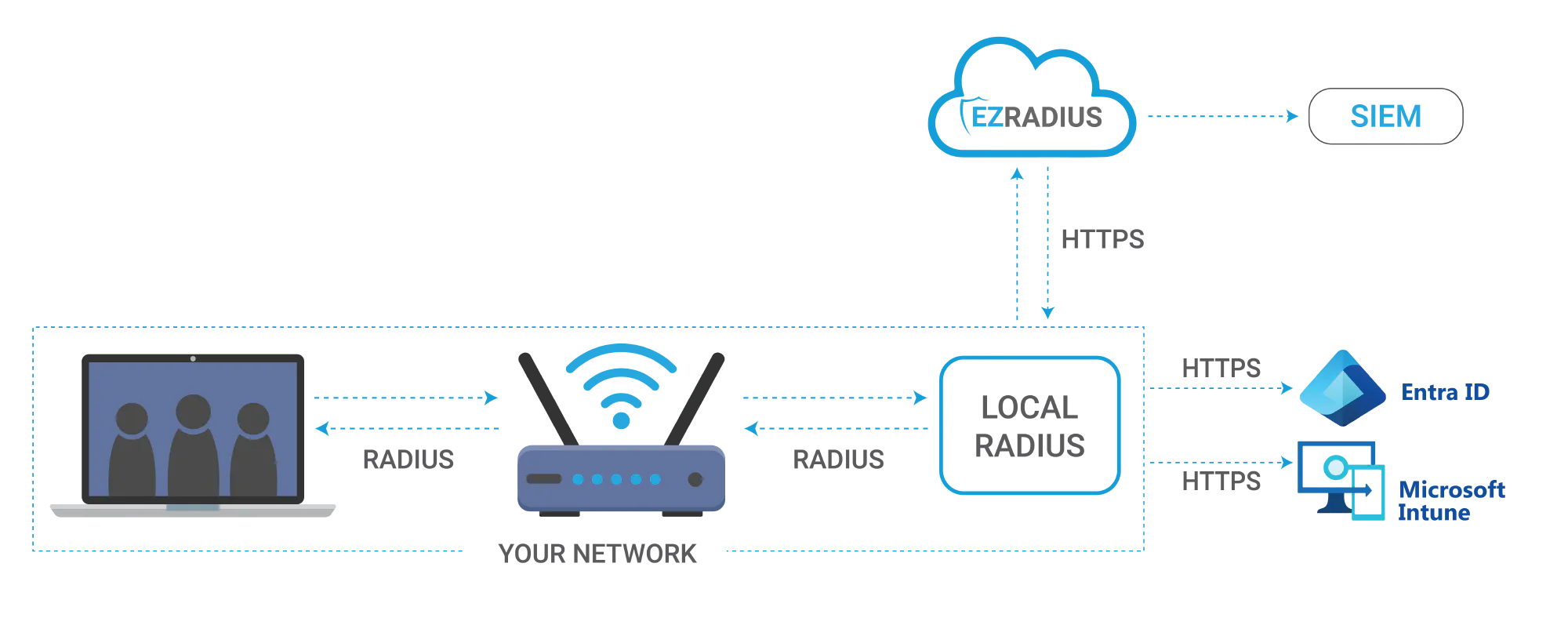
To help with these scenarios, EZRADIUS offers a local RADIUS proxy at no additional cost that you can deploy within your network to provide offline redundancy and reduced latency for your RADIUS authentication. The local RADIUS proxy will communicate directly with Entra ID and Intune to perform RADIUS authentication and authorization, with an added cache of user credentials and policies to allow for continued network access even when internet connectivity is unavailable or EZRADIUS is unreachable.
If I Use Cloud RADIUS, Can I Have a Local Fallback for Redundancy?
Yes! If you’re currently using a Cloud RADIUS service like EZRADIUS or plan to use one in the future, you can deploy a local RADIUS proxy within your network to provide offline redundancy and reduced latency for your RADIUS authentication. The local RADIUS proxy will sync with your Cloud RADIUS policies and credentials, allowing it to perform authentication and authorization directly with Entra ID and Intune even when the Cloud RADIUS service is unavailable or unreachable due to internet connectivity issues. This ensures that your users can still access the network and resources they need without interruption, while also providing a seamless fallback to the Cloud RADIUS service when connectivity is restored.
How Can I Run a Local RADIUS Proxy with EZRADIUS Cloud RADIUS?
The local RADIUS proxy is a lightweight Docker container that you can run on any Linux server or VM within your network, even on a device as small as a Raspberry Pi. It syncs to your EZRADIUS policies so you just need to launch the container and it will automatically pull down your RADIUS policies from EZRADIUS and keep them up to date.
Check out our step-by-step guide for detailed instructions on how to deploy the local RADIUS proxy in your network.
Step-by-Step Guide to Deploy Local RADIUS ProxyHow Much Does the Local RADIUS Proxy Cost?
The EZRADIUS local RADIUS proxy is included at no additional cost with your EZRADIUS Cloud RADIUS subscription for Basic, Dedicated, and Enterprise tiers. You can deploy as many EZRADIUS local RADIUS proxies as you need for redundancy and reduced latency without worrying about extra fees. It’s our way of ensuring that you have a highly available RADIUS solution that keeps your network secure and accessible at all times, even when your internet connection or the cloud service is unavailable.
Can I Deploy Multiple Local RADIUS Proxies for Redundancy?
Yes! You can deploy as many EZRADIUS local RADIUS proxies as you need within your network for redundancy and reduced latency. Each EZRADIUS local RADIUS proxy will sync with your EZRADIUS Cloud RADIUS policies and provide offline authentication capabilities, so you can have multiple proxies running in different locations or on different devices to ensure continuous network access for your users even if one proxy goes down or becomes unreachable. This allows you to create a highly resilient RADIUS deployment that can withstand various failure scenarios while keeping your network secure and accessible.
Can I Run the Local RADIUS Proxy in an Offline, Air-Gapped Environment?
The EZRADIUS local RADIUS proxy is designed to provide offline redundancy, but it does require an internet connection to sync policies, renew certificates, and perform Entra ID and Intune authentication (if configured). While you can run the local RADIUS proxy for long periods of time without internet connectivity (when using EAP-TLS certificate-based authentication that doesn’t require Entra ID or Intune authentication), at least some form of semi-regular internet connectivity is recommended to ensure the local RADIUS proxy can stay up to date with your latest policies and credentials from EZRADIUS.
How to Deploy a Local RADIUS Proxy for EZRADIUS Cloud RADIUS
To deploy a local RADIUS proxy for your EZRADIUS Cloud RADIUS deployment, follow the step-by-step guide in our documentation. It will guide you through the following steps:
- Create a new Entra ID app registration for the EZRADIUS local RADIUS proxy to allow it to authenticate to Entra ID and Intune directly without going through the EZRADIUS cloud RADIUS service.
- Register your new EZRADIUS local RADIUS proxy in the EZRADIUS portal so it can sync policies and credentials from your EZRADIUS Cloud RADIUS deployment.
- Download your EZRADIUS local RADIUS proxy configuration files and authentication certificate from EZRADIUS and copy them to your Linux server or VM where you will run the EZRADIUS local RADIUS proxy container.
- Launch the EZRADIUS local RADIUS proxy Docker container on your Linux server.
- Update your network controllers and access points to point to your new EZRADIUS local RADIUS proxy for authentication, with a fallback to the EZRADIUS Cloud RADIUS service for redundancy.
Have Questions or Need Help?
If you have any questions about deploying a local RADIUS proxy for your EZRADIUS Cloud RADIUS deployment or want to talk to a Keytos identity expert about your environment, make sure to book a free consultation with our team. We’re here to help you get the most out of your EZRADIUS deployment and ensure your network is secure and highly available.
Book a Free Consultation