


What is Entra CBA High Affinity?
 Keytos Team |
What is Entra CBA High Affinity?
Entra CBA High Affinity is a validation mode in Microsoft Entra CBA that allows organizations to map a certificate to a user account in Entra ID using the certificate’s public key. This mapping is done so that the specific certificate can be used for authentication, and it is stored in the Entra ID tenant.
Do I Need High Affinity?
We have a full blog explaining if you need High Affinity or not, but in short, you need High Affinity if you want to use the same certificate authority for multiple uses such as Intune SCEP and as a smart card for Entra CBA since it prevents a less secure certificate from being used for authentication. (Note: If you are using EZCA cloud PKI, you do not need to worry about High Affinity, as it segregates the certificates to ensure there is no impersonation.)
How To Enable High Affinity in Entra CBA?
When setting up Entra CBA, you can enable High Affinity when setting up how you want to authenticate the specific CA. The video below walks through how to enable High Affinity in Entra CBA, and how EZCMS is the easiest way to automate the certificate registration process.
How Does Entra High Affinity Work?
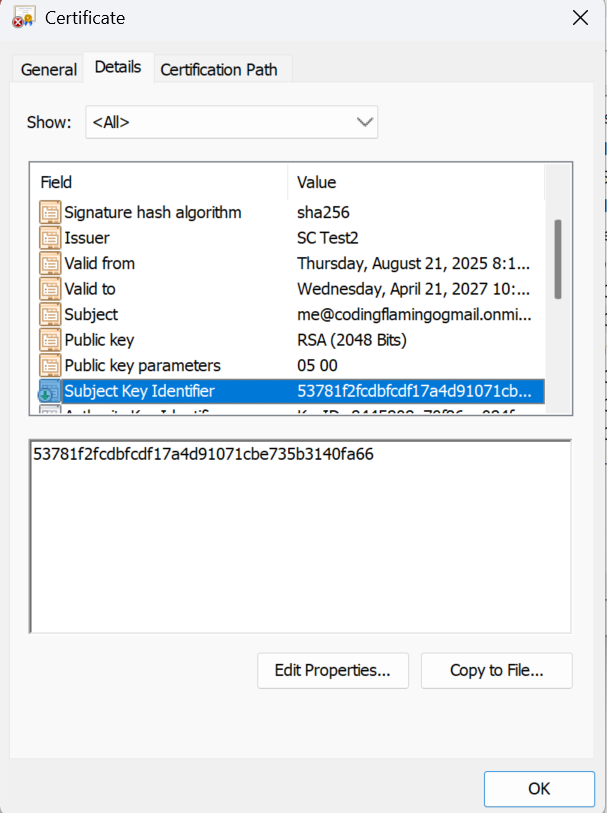
As previously mentioned, Entra CBA depends on a certificate value (usually the Subject Key Identifier (SKI)) that must be registered on a user’s profile to signify that the specific certificate can be used for Entra CBA authentication for that user. Basically, it hardcodes that the specific certificate is the one that can be used, and even if other certificates match the other requirements for that user, they cannot be used.
What Does the AADSTS50017 Error Mean When Doing Entra CBA Authentication?
AADSTS50017 is a common error that means Entra ID didn’t trust the certificate. The main two reasons this happens:
- An issue with the certificate chain, such as an untrusted root or intermediate CA.
- The value used for high affinity is not in the certificate, or it has not been registered to the user. Make sure that the right value is registered for that specific user.