



How to Issue SCEP Certificates in NinjaOne with EZCA
 Keytos Team |
Overview - How to Issue SCEP Certificates in NinjaOne with EZCA
Since NinjaOne does not have built-in support for SCEP certificate issuance, issuing passwordless certificates for Wi-Fi and VPN authentication has been a complex process full of custom scripting and manual configuration. However, with EZCA Cloud PKI, you can now easily integrate SCEP certificate issuance into NinjaOne, allowing you to automate the deployment of certificates for 802.1X authentication on Windows, macOS, iOS, and iPad devices.
How Have NinjaOne Administrators Been Issuing Certificates So Far?
Before EZCA, NinjaOne administrators had to manually craft custom scripts and push them to devices, hybrid-join their devices and deploy AD CS certificates, or just simply avoid using certificates for Wi-Fi and VPN authentication. There wasn’t a straightforward way to automate SCEP certificate issuance directly from NinjaOne.
How Does EZCA Enable SCEP Certificate Issuance in NinjaOne?
EZCA is a cloud-native Certificate Authority (CA) that provides a simple API plus user-friendly tooling for issuing and managing certificates. Whether you’re on Windows, macOS, iOS, or any other platform, EZCA can issue strong certificates for 802.1X authentication without the need for complex on-premises infrastructure. By integrating EZCA with NinjaOne, you can automate the entire certificate issuance process, allowing you to easily deploy SCEP certificates to your devices for secure Wi-Fi and VPN authentication.
How Much Does It Cost to Use EZCA for SCEP Certificate Issuance in NinjaOne?
With EZCA, you pay a low monthly cost for your Certificate Authority, with no per-certificate fee. This means you can issue as many SCEP certificates as you need for your devices without worrying about additional costs. The pricing is designed to be affordable and scalable, making it a great choice for organizations of all sizes looking to implement secure certificate-based authentication with NinjaOne.
Plus, with a robust set of free tooling and integrations, EZCA can integrate with NinjaOne and other platforms without the need for custom development or scripting. Just follow our step-by-step guides to get up and running in minutes.
Can I Audit and Revoke SCEP Certificates Issued by EZCA in NinjaOne?
Yes! Every certificate issued by EZCA is logged and easily auditable so you can track which certificates have been issued, to which devices, and when. If you need to revoke a certificate for any reason, you can do so with just a few clicks in the EZCA dashboard.
Can I Use EZCA Certificates for Wi-Fi and VPN Authentication in NinjaOne?
Absolutely! The SCEP certificates issued by EZCA are fully compatible with 802.1X authentication for both Wi-Fi and VPN. This means you can use these certificates to secure your network access and ensure that only authorized devices can connect to your Wi-Fi and VPN networks.
How to Set Up SCEP Certificate Issuance in NinjaOne with EZCA
To set up SCEP certificate issuance in NinjaOne using EZCA, follow these steps:
How to Issue SCEP Certificates to Windows Devices in NinjaOne
NinjaOne provides Automations that allow you to run scripts on your Windows devices. EZCA provides NinjaOne scripts in our Windows NinjaOne guide that easily and securely issue SCEP certificates to your Windows devices for 802.1X authentication.
To begin issuing SCEP certificates to your Windows devices in NinjaOne:
-
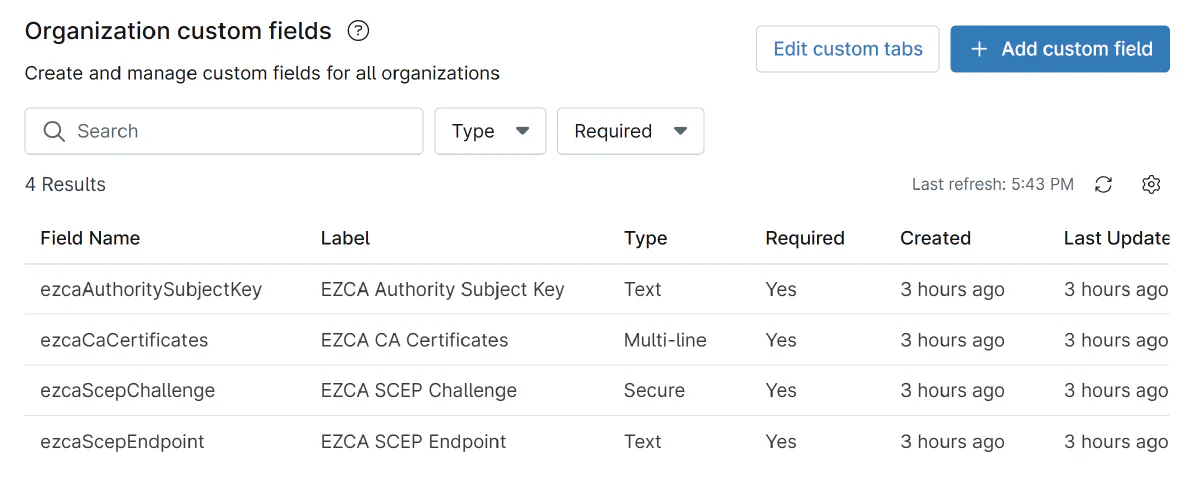
Create a set of Organization Custom Fields in NinjaOne to store the necessary information for SCEP certificate issuance, such as EZCA’s SCEP URL, your SCEP challenge, and other relevant details. NinjaOne has role-based access control for these fields, so you can lock down access to your SCEP configuration information to only the administrators and scripts that need it.
-
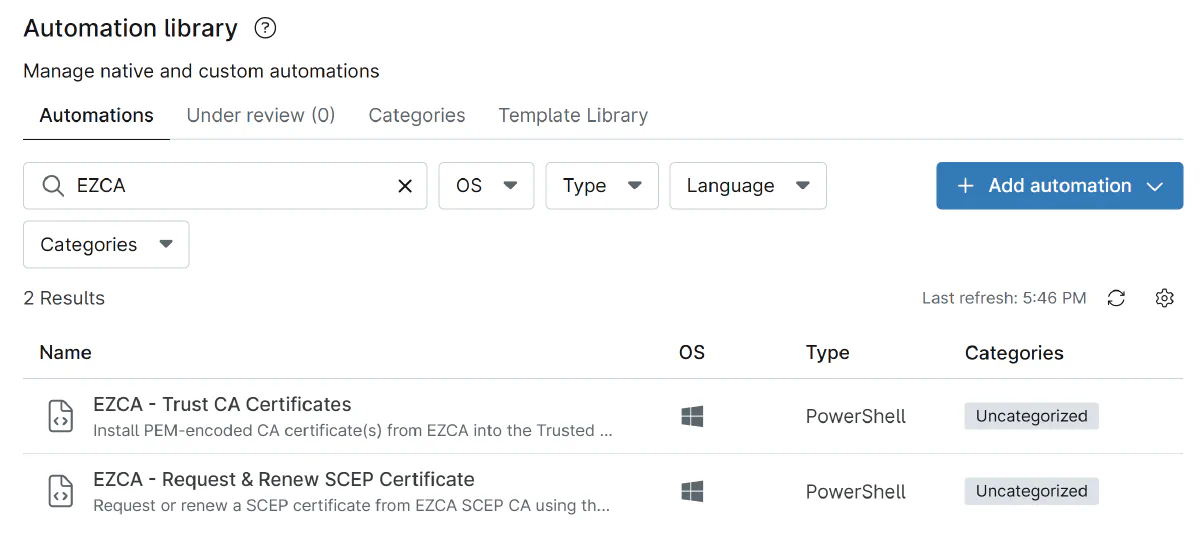
Create Automation Scripts in NinjaOne using the scripts provided in our guide. These scripts will pull the necessary information from your Organization Custom Fields and use it to request SCEP certificates from EZCA for your Windows devices.
-
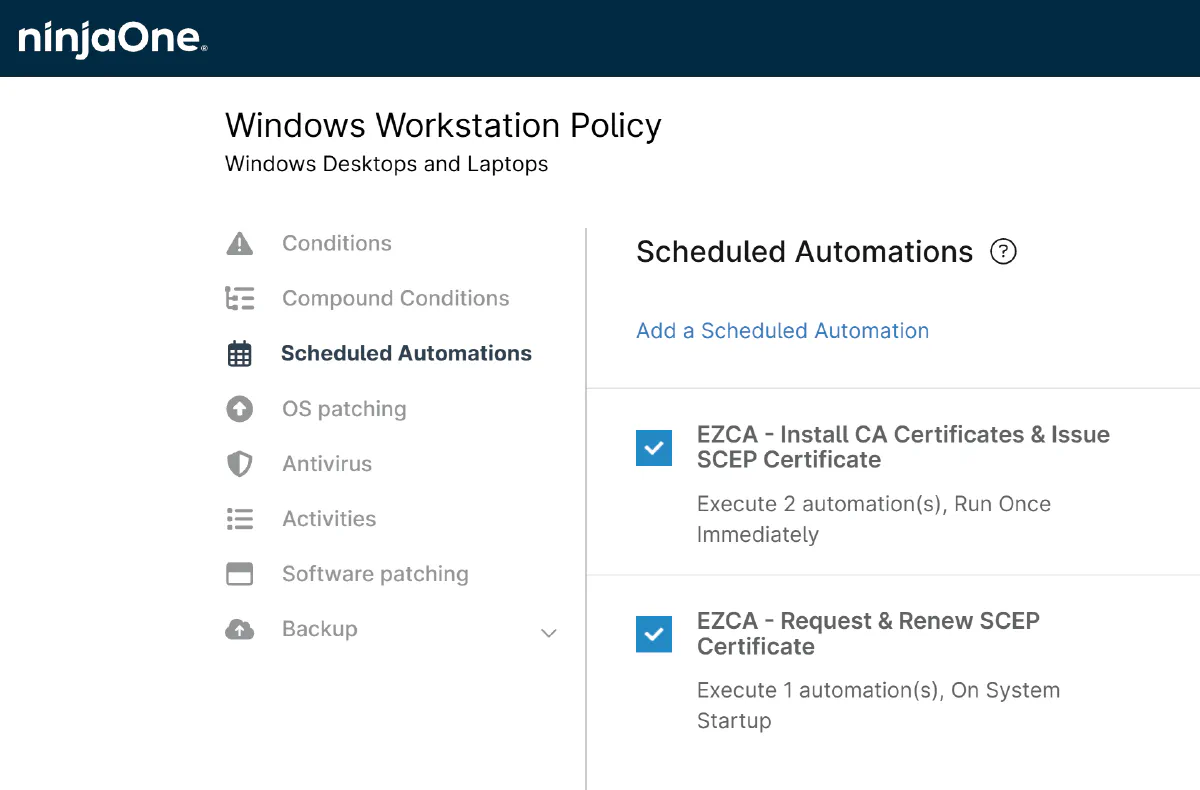
Update your Windows Policy so your devices run the SCEP certificate issuance scripts to get their first SCEP certificate and check for renewal on a regular basis.
-
Done! Your Windows devices will now automatically request and install SCEP certificates from EZCA for 802.1X authentication.
How To Issue SCEP Certificates to macOS, iOS, and iPad Devices in NinjaOne
NinjaOne’s MDM capabilities allow you to manage and deploy configurations to your macOS, iOS, and iPad devices using Apple’s native MDM capabilities. Simply add a .mobileconfig profile to your NinjaOne MDM configuration with the appropriate SCEP payload, and EZCA will handle the certificate issuance for you.
To begin issuing SCEP certificates to your macOS, iOS, and iPad devices in NinjaOne:
-
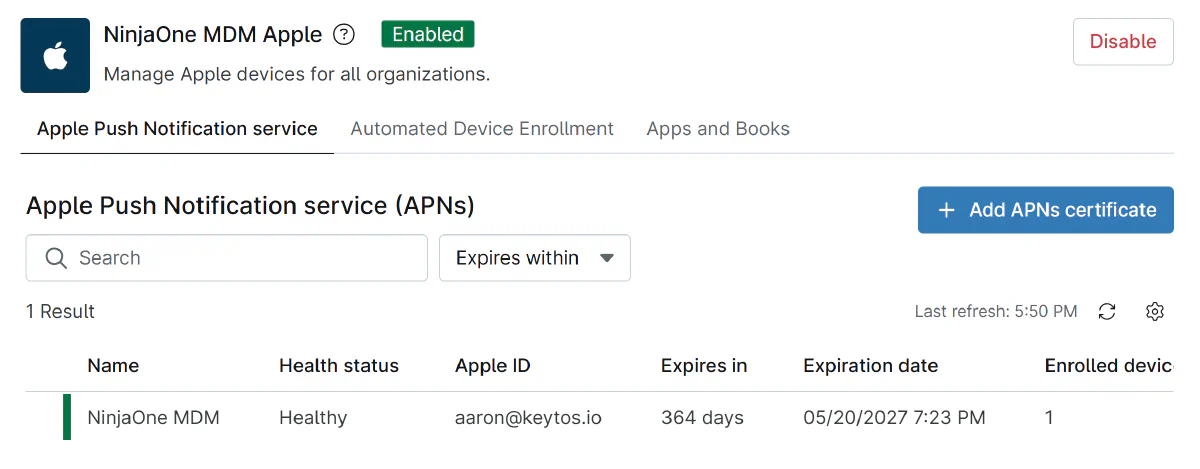
Configure your Apple Push Notification Service (APNs) in NinjaOne to enable MDM management for your Apple devices. This will allow you to deploy MDM profiles to your macOS, iOS, and iPad devices.
-
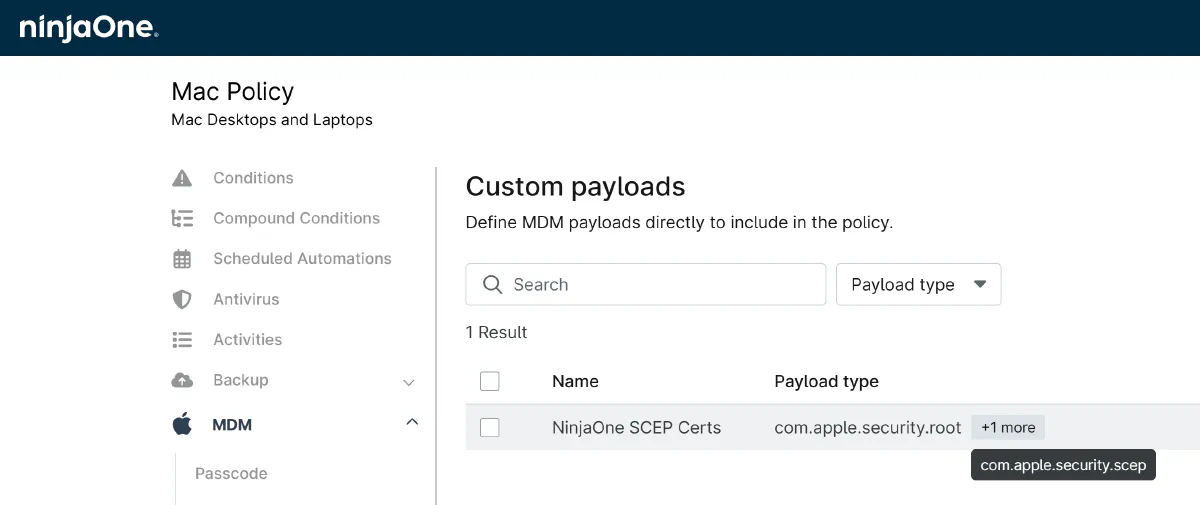
Create a .mobileconfig profile with the appropriate SCEP payload to request certificates from EZCA. You can use the Apple Configurator or any other tool that can create .mobileconfig files to create this profile.
-
Add the .mobileconfig profile to your NinjaOne macOS/iOS/iPadOS MDM configuration and deploy it to your macOS, iOS, and iPad devices.
-
Done! Your macOS, iOS, and iPad devices will now automatically request and install SCEP certificates from EZCA for 802.1X authentication.
Issue SCEP Certificates to Android Devices in NinjaOne
While NinjaOne does support Android device management, SCEP certificate issuance via EZCA is not currently ready. We’re actively working on a solution for Android devices, so stay tuned for updates on this front!
Conclusion - Issuing SCEP Certificates in NinjaOne
The steps above help complete the full device management lifecycle in NinjaOne with EZCA, allowing you to easily issue and manage SCEP certificates for secure Wi-Fi and VPN authentication on your Windows, macOS, iOS, and iPad devices. With EZCA’s simple API and user-friendly tooling, you can automate the entire certificate issuance process without the need for complex scripting or on-premises infrastructure. This integration empowers you to enhance your network security with strong certificate-based authentication while keeping management simple and efficient through NinjaOne.
Want to Talk About How EZCA Can Help You Issue SCEP Certificates in NinjaOne?
If you’re interested in learning more about how EZCA can help you issue SCEP certificates in NinjaOne for secure Wi-Fi and VPN authentication, we’d love to chat! You can schedule a demo with our team to see EZCA in action and discuss how it can fit into your existing infrastructure. We’re here to help you simplify certificate management and enhance your network security with EZCA and NinjaOne!