











How EZMonitor monitors your internal and external X.509 certificates
EZMonitor leverages Certificate Transparency logs and an internal scanner to protect both your public and private certificates.
How Certificate Transparency logs work
After a compromised Certificate Authority was used to attack Google customers, Google pushed the industry to create Certificate Transparency logs. Each publicly trusted certificate must be registered in these logs by the certificate authority for it to be trusted by a web browser, which enables organizations to monitor the logs and detect any certificate that was not issued by the organization.
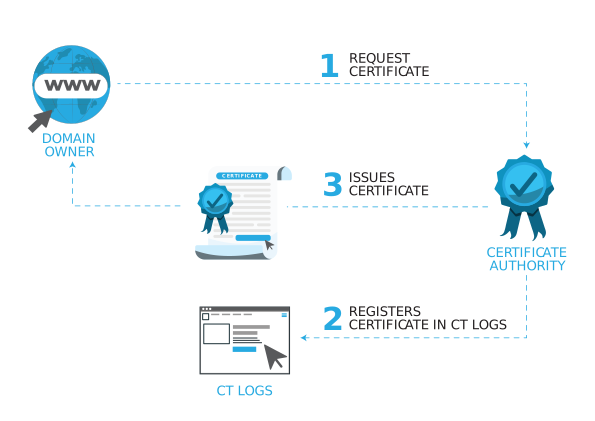
A domain owner requests a certificate
Someone in your organization (or someone claiming to be) asks a certificate authority for a certificate for one of your domains.
The CA registers it in the logs
The certificate authority registers the certificate in multiple Certificate Transparency log providers.
The certificate is issued and installed
The issued certificate goes back to the requester to be installed on their web servers.
EZCMS detects the new certificate
EZCMS detects the new certificate in the Certificate Transparency logs and indexes it for monitoring and alerting.
How EZMonitor monitors
Certificate Transparency logs
EZMonitor scans and indexes over 35 million Certificate Transparency logs every day for detailed monitoring and alerting on public SSL certificates.
Scan and index the logs
EZMonitor continuously scans and indexes the transparency logs, building a picture of every publicly trusted certificate issued against your organization.
Build your SSL health dashboard
Everything found becomes an easy to use health dashboard where you can see your organization's SSL posture in one place, rather than chasing certificates team by team.
Alert on the anomalies
Cloud intelligence detects and alerts on the anomalies that could affect your reputation, either by causing an outage or by enabling an attack, with step by step remediation guidance.
How EZMonitor monitors
internal PKI certificates
AD CS certificate download
The agent contacts your Active Directory Certificate Services CA, downloads every certificate that CA issued, and uploads them to EZMonitor, which then alerts on any certificate error that might cause an outage.
Active Directory DNS lookup
Maintaining a list of every domain in your organization by hand is not realistic, so EZMonitor uses Active Directory DNS lookup to find the domains you host and adds them to the scanning range automatically.
Network scan
The agent takes the domain list built from manual upload, AD CS download, and AD DNS lookup, scans all of them, and alerts on any SSL issue detected on the network.
Protocols & technical details
Public discovery
Private discovery
Alerting
Secure your SSL endpoints in minutes
Start a free trial today, or talk to one of our SSL experts about how EZMonitor can protect your organization while preventing a costly outage.
Transparent pricing
View pricing detailsStartup
Certificate transparency monitoring for up to 10 subdomains
Basic
Most popular ✦Unauthorized issuance monitoring across every domain and subdomain
Enterprise
Adds internal network scanning, SIEM export, and 24/7 support
Frequently asked questions
After a compromised Certificate Authority was used to attack Google customers, Google pushed the industry to create Certificate Transparency logs. Each publicly trusted certificate must be registered in these logs by the certificate authority for it to be trusted by a web browser, which enables organizations to monitor the logs and detect any certificate that was not issued by the organization.
Unauthorized issued certificates can range from a developer in your organization not following your approved certificate issuance process and issuing a certificate through another provider, to an attacker compromising a certificate authority and issuing a rogue certificate on behalf of your organization. EZMonitor enables you to monitor all certificates issued for your organization and detect any unauthorized certificate issuance.
Over the past few years, over 80% of companies have reported a certificate related outage, including high profile ones such as the Epic Games 2021 outage. EZMonitor helps you prevent SSL related outages by alerting on certificates near expiration date that have not been renewed. EZMonitor also scans your organization's publicly available endpoints and will alert on any endpoint where a new certificate has not been installed.
Domain takeover occurs when a DNS entry for a subdomain is not removed from the DNS record when the site is no longer used, which enables attackers to create a site on that resource and impersonate your organization. EZMonitor scans your subdomains and alerts you if any dangling DNS entry pointing to a cloud resource is found. Watch our webinar, where we talk about how EZMonitor found over 30,000 vulnerable Azure domains in its first month of operation.
A popular method of impersonating companies is by creating a sub-domain containing your domain, such as your_domain.com.hackers_domain.com, making your user believe that it is a valid domain since it starts with your_domain.com. EZMonitor actively monitors the web and alerts you if a certificate containing your domain is detected.
Keeping up with the latest SSL security news and best practices is a full time job. EZMonitor keeps up with the latest SSL news, such as the 2021 Let's Encrypt misconfiguration. If a misconfiguration is detected in one of your domains, EZMonitor alerts you with detailed step by step actions you must take to keep your organization secure and compliant.
EZMonitor enables you to gain visibility into your private certificates by scanning the internal network of your organization. The internal network scan requires you to run our scanning agent from a Windows machine, and it combines three features: Active Directory Certificate Services certificate download, Active Directory DNS lookup, and a network scan of every discovered domain.