






Protect Your Intune Devices and Networks with Cloud RADIUS
Authenticate Wi-Fi, VPN, and network access with the Entra ID and Intune you already
manage.
No sync jobs, no bolt-ons - just native integration built for zero trust.
EZRADIUS was built to be the Cloud RADIUS layer for Microsoft Intune, checking
compliance at every connection instead of just at enrollment
Native Entra ID and Intune integration checked in real time, no
sync jobs or bolt-ons
Zero trust Intune device compliance enforced at the moment of
authentication, not just enrollment
Instant revocation the moment a device is wiped or retired with no
CRL propagation delay
Customized network policies based on Entra ID and Intune device
groups
Works with Microsoft Cloud PKI, AD CS, or any certificate
authority
Seamless Wi-Fi profiles for Windows, macOS, Android, and iOS
Other Cloud RADIUS Providers
Entra ID and Intune bolted on after the fact, if supported at all
No checks for Intune device compliance means stale devices can still connect to the network
Access relies on CRL updates that can take hours or days to propagate
One-size-fits-all network policies, no device-group targeting
Locked into a single certificate authority or manual PKI setup
Manual Wi-Fi profile configuration, one device at a time
Cloud RADIUS Up and Running in 3 Easy Steps
No sync jobs, no bolt-ons. Connect the Intune and Entra ID you already
manage and start authenticating in minutes.
1
Deploy EZRADIUS in Azure
Deploy EZRADIUS from the Azure Marketplace in just a few clicks, with no servers or VMs to
buy or maintain.
2
Push Wi-Fi Profiles & Policies
Configure Wi-Fi profiles and device-group network policies in Intune so managed devices
connect automatically.
3
Start Authenticating
Point your network devices to EZRADIUS' global set of IPs and start authenticating your
Windows, macOS, Android, and iOS devices.
Built Around the Devices Intune Already Manages
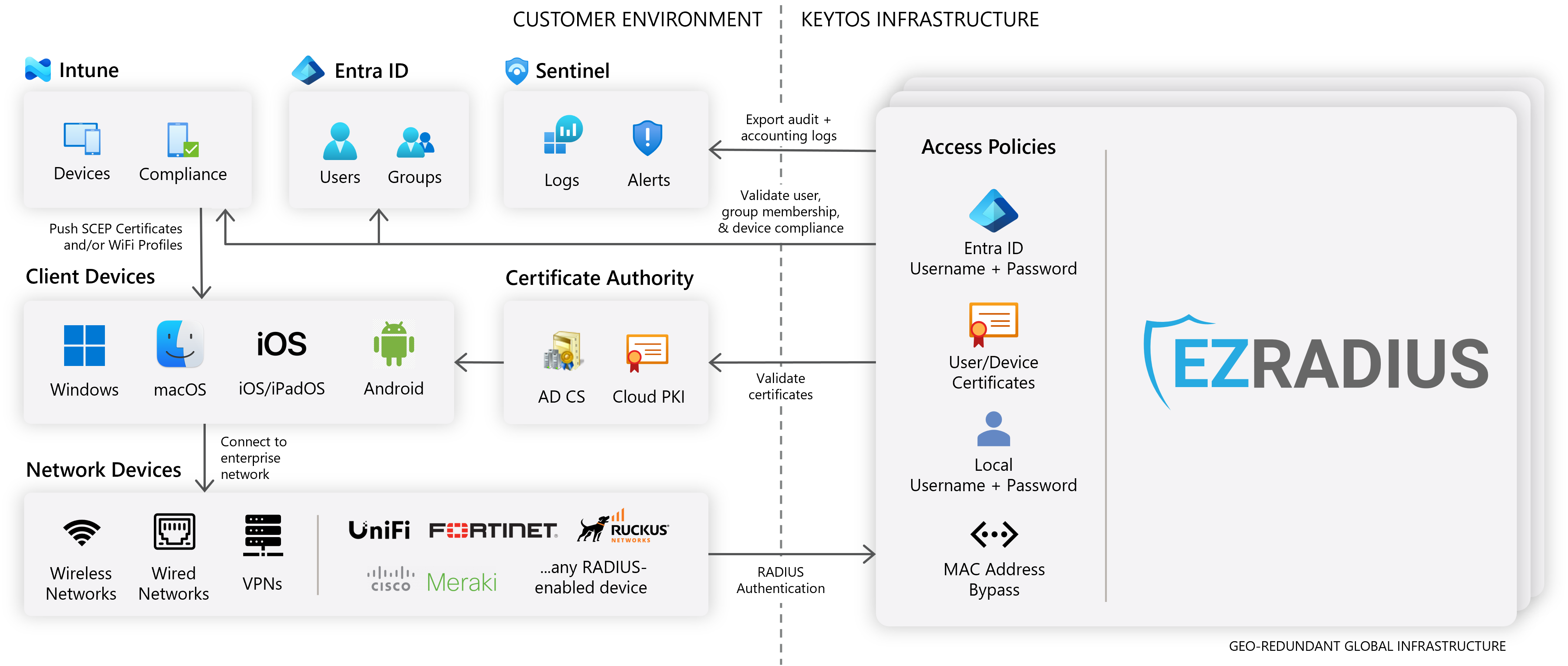
EZRADIUS connects directly to Microsoft Intune and
Entra ID, checking device compliance and group membership at the moment of authentication, so
managed Windows, macOS, Android, and iOS devices connect automatically, with instant revocation the
moment a device is wiped or retired.
Free 1-month trial · Instant revocation, no CRL wait · Works
with Windows, macOS, Android & iOS
Frequently Asked Questions
Does EZRADIUS integrate natively with Microsoft Intune and Entra ID?
Yes. EZRADIUS connects directly to Microsoft Intune and Entra ID, with no sync jobs, agents, or
bolt-on connectors to maintain.
Can I Deploy EZRADIUS via the Azure Marketplace?
Yes. EZRADIUS is available in the Azure Marketplace, so you can deploy it in just a few clicks, with no servers or VMs to buy or maintain. Plus, for eligible EA customers, you can use your MACC credits.
Does EZRADIUS deploy any Azure VMs or other infrastructure in my subscription?
No. EZRADIUS is a fully managed Cloud RADIUS service, so you don't need to deploy or maintain any
Azure VMs or other infrastructure in your subscription. EZRADIUS runs on Keytos' global infrastructure and securely connects to your Intune and Entra ID environment. You only pay for the SaaS service, not for any underlying infrastructure.
Does EZRADIUS check Intune device compliance at every authentication?
Yes. EZRADIUS evaluates Intune device compliance at the moment of authentication, not just at
enrollment, so only managed, compliant devices are granted network access. This is core to a
zero trust network architecture.
Does EZRADIUS revoke access instantly when a device is wiped or retired?
Yes. EZRADIUS checks Intune and Entra ID status in real time, so wiped, retired, or rolled devices
lose network access immediately. Other Cloud RADIUS providers rely on Certificate Revocation
Lists (CRLs), which can take hours or even days to propagate.
Can I set different network policies for different device groups?
Yes. EZRADIUS lets you build network access policies based on Entra ID and Intune device or user
groups, so different teams, device types, or compliance levels can be routed to different
network segments.
Does EZRADIUS support Microsoft Cloud PKI?
Yes. EZRADIUS trusts certificates issued by Microsoft Cloud PKI, AD CS, EZCA, or any other
certificate authority, so you can keep the PKI you already have.
Can EZRADIUS push Wi-Fi profiles to managed devices?
Yes. EZRADIUS works with the Wi-Fi profiles you configure in Intune, so managed devices connect
to the network automatically as soon as they power on, with no end-user setup required.
Which platforms does EZRADIUS support?
EZRADIUS supports Windows, macOS, Android, and Apple mobile devices (iOS/iPadOS), so every
platform Intune manages can authenticate to your network.
Is there a free trial for EZRADIUS?
Yes. New customers get a free 1-month trial before any charges apply, so you can validate
EZRADIUS against your own Intune environment before committing.