











Azure IoT Device Security Best Practices
 Keytos Team |
Azure IoT Device Security Best Practices
As IoT (Internet of Things) has skyrocketed in mainstream popularity, many businesses find it to be a must-have in order to successfully compete and grow; however, businesses are not the only ones taking note of IoT’s rise in prominence. Hackers have taken advantage of a lack of proper IoT security practices to conduct attacks ranging from small-scale ones directed at specific companies to large-scale ones such as the attack on DNS infrastructure by the Mirai Botnet. The main commonality between most of these IoT attacks is a weak identity story to manage the IoT devices.
As the IoT realm matures, it is our responsibility to employ best practices to protect millions of global users from these bad actors and, in doing so, to address the many IoT device security concerns that have come forth. In this article, we will share a guide outlining these best practices to help you create a device provisioning system that is both secure and compliant.
What is IoT?
Before we dive into the best practices of IoT security and how to combat IoT devices’ vulnerabilities, it’s important to briefly clarify just what exactly IoT is. The Internet of Things is a broad term that refers to any software that interacts with other devices over some network. IoT is a buzzword that has gained a lot of traction in the last few years, but can be traced as far back as the early 1980s with a Coca-Cola machine at Carnegie Mellon University. Safe to say, the Internet of Things has as rich a backstory as your favorite superhero, just without the trio of blockbusters and poorly rated TV spinoffs.
The Challenge of Effective IoT Security
The biggest problem with creating new IoT devices is that you must create these devices at scale while also enabling the devices to authenticate securely within the cloud, making it incredibly difficult to design a secure identity bootstrapping story. This problem is further complicated because of the limitations inherent in IoT devices – unlike larger and more powerful computers, IoT devices are quite limited in computing power and storage size.
So, how exactly did companies address this? By not just leaving the door open for hackers to get inside, but by putting out a beautiful dinner platter to entice them to show up. What many companies did was establish a shared secret between the cloud and all of their IoT devices; all hackers needed to do was crack just one simple password and they could control thousands – or even millions – of IoT devices. All due to poor security planning. For shame.
How to Secure IoT Devices
Defining the problem is great, but what can we do about it? How can we safely secure IoT devices? Well, industry experts recommend using cryptographic certificates to control authentication between IoT devices and cloud services. If administered properly, certificate authentication enables organizations to have a secure authority that issues credentials to their IoT devices, allowing for credential rotation while also giving organizations the ability to revoke compromised credentials.
What Are Certificates? How do Certificates Work?
Before we can properly authenticate certificates, we first need to gain an understanding of how certificates work. Certificates can be either self-signed or signed by a trusted authority – by having a trusted authority sign a certificate, you then only need to monitor the certificate authorities (CAs) as opposed to needing to register each individual certificate with the identity provider, this is similar as how an officer doesn’t have to know your drivers license number, instead they see that it is issued by a trusted authority and accept your identity as valid.
How to Bootstrap a New IoT Device to Azure IoT Hub
The biggest obstacle with bootstrapping a new IoT device is that devices need a way to authenticate with the cloud without sharing a common credential between all IoT devices. As aforementioned, the easiest way to circumvent this obstacle is by using certificates. We even created a code sample to automatically provision IoT devices in Azure IoT with a trusted CA; however, this code sample doesn’t cover how this should look in the factory. Here’s the steps on how to bootstrap the identity of a new IoT device:
How to Create an IoT SSL Certificate in the Factory
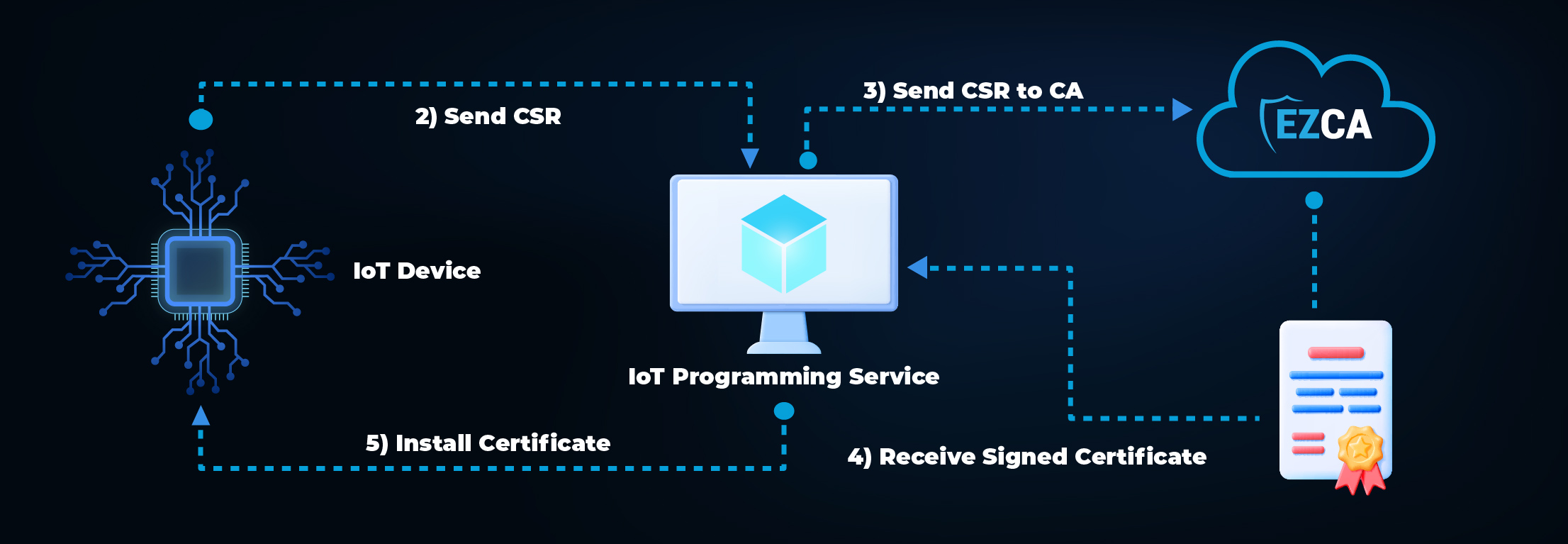
How to Register and Connect an IoT Device to Azure IoT Hub
Note: Connecting to Azure does not need to happen in the factory – once the certificate is loaded, the IoT device can use that certificate to register itself in Azure once the IoT device is going to be used.
Ultimately, IoT device vulnerabilities can be mitigated by having a proper design. For more information on how Keytos makes connecting to Azure IoT painless, check out our One Click Azure IoT Integration and schedule a demo today!