


Do I Need to Move to Short-Lived 47-Day Certificates for Private PKI?
 Aaron Crawfis |
Why Are Public CAs Moving to Short-Lived 47-Day Certificates?
In 2025 the CA/Browser Forum (CAB Forum) voted to require that all publicly trusted SSL/TLS certificates issued by public CAs have a maximum validity of 47 days. This means that starting in March 2029, any publicly trusted certificate that is valid for more than 47 days will be rejected by browsers and operating systems. If you host a website or service that uses a public CA-issued certificate from Let’s Encrypt, DigiCert, Sectigo, or any other public CA, you need to make sure that your certificate is renewed at least every 47 days, or your users will see a certificate error when they visit your site.
Check out a recent BlueHat talk on the topic of 47-day certificates which explains the reasoning behind the CAB Forum’s decision to move to 47-day certificates:
Why Do Longer-Lived Certificates Pose a Security Risk?
But why did the CAB Forum decide to move to 47-day certificates? The main reason is security. When certificates are stolen or leaked, it’s often impossible to detect the compromise until after the certificate has been used for malicious purposes. By that point it’s too late, the attacker has already used the certificate to impersonate your website or service.
For most certificates you can prevent private key compromise by using hardware-bound private keys, such as a Hardware Security Module (HSM) or a Trusted Platform Module (TPM). Even if an attacker gets access to the physical server or to the VM, there’s no way to get to the private key. Hardware bound keys are often used for CA signing keys and SCEP device certificates, but for a lot of public website SSL certificates, they are often just stored on disk or in memory. If an attacker can get access to the server or VM containing the private key, they can steal it and use it to impersonate your website or service.
Doesn’t Certificate Revocation Solve the Problem of Key Compromise?
For public certificates, revocation doesn’t really solve the underlying security and usability risks. While there are technologies like Certificate Revocation Lists (CRLs) and the Online Certificate Status Protocol (OCSP) that can be used to revoke certificates, they have four main issues:
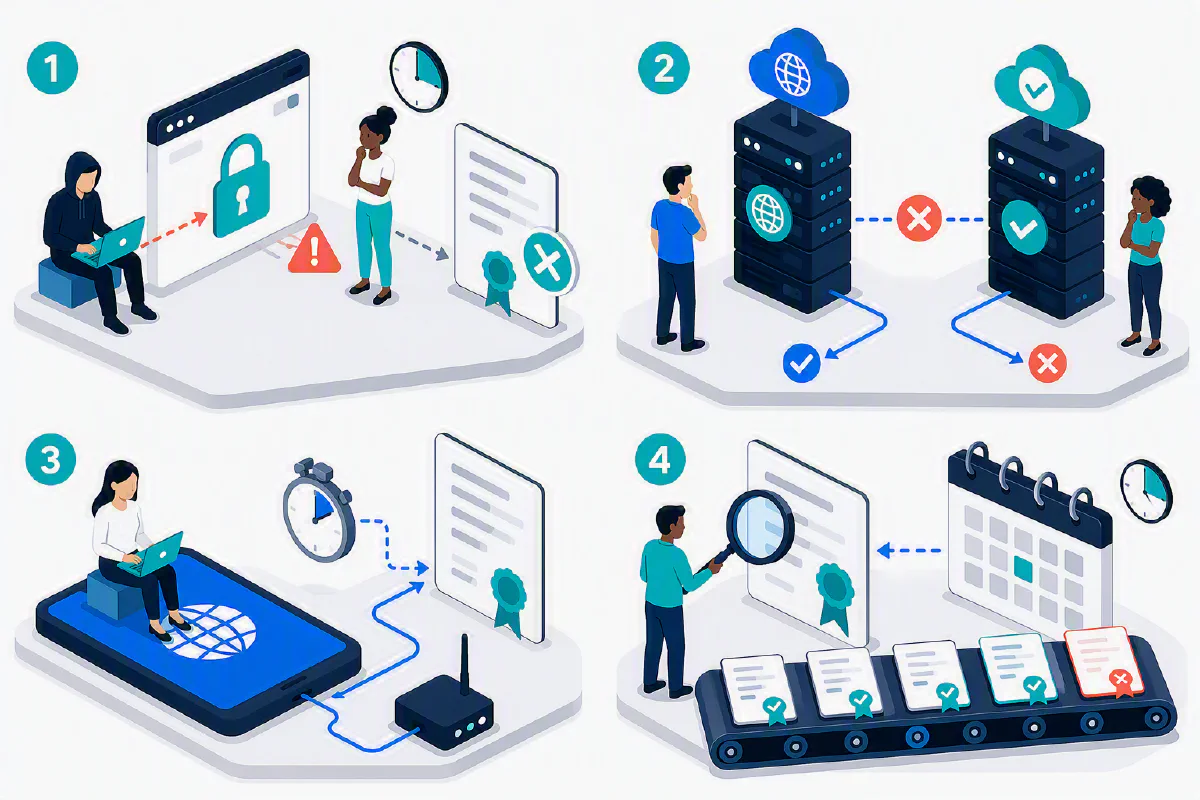
- By the time you detect that a certificate has been compromised, it’s often too late. The attacker has already used the certificate to impersonate your website or service. While a late revocation is definitely better than no revocation, it doesn’t prevent the initial attack and at best it’s only a reactive measure.
- CRLs and OCSP don’t have perfect uptime. You either need to “fail open” (allow the certificate to be used even if the revocation check fails) or “fail closed” (block the certificate if the revocation check fails). Both options have their own risks and trade-offs.
- Checking every website’s certificate against a CRL or OCSP server adds latency to every HTTPS request. This is especially true for mobile devices, which may have limited connectivity and bandwidth.
- CRLs have a limited size and are only updated periodically. If a certificate is revoked after the last CRL update, it won’t be included in the CRL until the next update. This means that there can be a delay between when a certificate is revoked and when it is actually recognized as revoked by clients checking the CRL.
For these reasons and more, most browsers and operating systems no longer check revocation status for public certificates. If you revoke a public certificate, it will still be accepted by most browsers and operating systems until it expires.
Assume Breach and Move to Short-Lived Certificates Plus Automation
Given the risks of long-lived certificates and the limitations of revocation, the CAB Forum decided to move to short-lived certificates. By limiting the lifetime of a certificate to 47 days, you assume that certificates will eventually be compromised, and the goal becomes to limit the blast radius of the compromise. Additionally, a 47-day window is short enough that most organizations will move to automation, as a manual renewal process is way too painful to manage.
By moving to automation, humans are no longer in the loop, which reduces the risk of human error and leakage. Certificates are no longer moved around on USB drives or emailed to people, which reduces the risk of compromise. Instead, certificates are automatically renewed and deployed by software, which is much more secure. Protocols like ACME (Automated Certificate Management Environment) are now widely used to automate certificate issuance and renewal, and most public CAs support ACME for their public certificates. Check out our blog on How to Automate Certificate Issuance and Renewal with ACME for more information on how to use ACME for private PKI.
Learn How to Use ACME for Private PKIDo I Need to Move to 47-Day Certificates for Private PKI?
Since the CAB Forum’s 47-day certificate requirement only applies to publicly trusted certificates, private PKI is out of scope for this requirement, and you do not have to move to 47-day certificates for your private PKI. However, it’s not a bad idea to also move your private PKI to 47-day certificates, as it can drastically reduce the risk of compromise and improve security. However, there are a few things to keep in mind when deciding whether to move to 47-day certificates for your private PKI:
- What types of certificates are you issuing? If you’re Smart Card certificates that live on a physical card, it probably doesn’t make sense to move to 47-day certificates, as your users don’t want to have to renew their certificates every month. Since your users (hopefully) keep their Smart Cards and YubiKeys on or near them at all times, and they’re unplugged most of the time, the risk of compromise is much, much lower than a public certificate that is on a web server. It’s not uncommon for organizations to issue Smart Card certificates that are valid for 1-3 years.
- Where is your private key stored? If your private key is stored in a Hardware Security Module (HSM) or Trusted Platform Module (TPM), it’s physically impossible to extract the private key from the device. This drastically reduces the risk of compromise, and you can issue longer-lived certificates that are valid for months or more.
- What happens when a device is offline for a long time? Moving to 47-day certificates may not make sense for device certificates that might be offline for extended periods of time, such as employee laptops when they go on vacation or parental leave for a few months. If they come back into the office and can no longer get onto the Wi-Fi or connect to the VPN because their certificate has expired, that can be a huge pain point for your IT team. It might make more sense to issue 3-6 month certificates for these devices, and ensure that there’s a TPM protecting the private key so that the risk of compromise is still low.
- How automated is your certificate issuance and renewal process? If you have a fully automated certificate issuance and renewal process, then moving to short-lived certificates may not be a big deal. However, if you’re manually signing CSRs and uploading certificates via portals, then it probably doesn’t make sense to move to short-lived certificates, as it will be a huge pain for your IT team to manage.
Plus, in most private PKI environments, CRLs and OCSP are still widely used, so revocation is still a viable option for private PKI. We usually recommend:
- 47-day certificates for private SSL certificates using ACME
- 3-6 month certificates for private device certificates with TPM protection
- 1-3 year certificates for private Smart Card certificates bound to an offline physical device
How Can I Move to Short-Lived Certificates for Private PKI?
If you want to reduce the risk of compromise in your private PKI environment, the first priority is to move to hardware-bound private keys, such as a Hardware Security Module (HSM) or Trusted Platform Module (TPM). This will drastically reduce the risk of compromise. From there, the next step is to move to short-lived certificates, which can be done in a few different ways:
- Use ACME for private SSL certificates: If you’re issuing private SSL certificates for internal websites and services, you can use ACME to automate the issuance and renewal of short-lived certificates. Make sure you use a private CA that supports ACME such as EZCA, and that you properly protect your endpoints and DNS records depending on the ACME challenge type you choose.
- Use SCEP for private device certificates: If you’re issuing private device certificates for laptops, desktops, and other devices, you can use SCEP to automate the issuance and renewal of short-lived certificates via your Mobile Device Management (MDM) solution.
- Use a self-service solutions for Smart Card onboarding and renewal: If you’re issuing private Smart Card certificates, you can use a self-service solution like EZCMS which allows your users to easily onboard and renew their Smart Card certificates without having to go through IT. This eliminates the pain of renewing your Smart Card certificates and allows you to move to shorter-lived certificates where it makes sense.
Talk to an Identity Expert About Moving to Short-Lived Certificates
Want to talk with an identity expert here at Keytos about your private PKI environment and how to move to short-lived certificates? Schedule a free consultation with a member of our team today, and we’ll help you figure out the best approach for your organization.
Schedule a Free Consultation with a Keytos Identity Expert