



How to Isolate and Secure Wi-Fi OT (Operational Technology) Networks Using RADIUS
 Aaron Crawfis |
Walk onto almost any modern plant floor, warehouse, or hospital and you will find dozens or hundreds of devices talking over Wi-Fi: handheld scanners, autonomous mobile robots, HMI tablets, wireless sensor gateways, and cameras. Most of them are connected with a pre-shared key that was typed in during commissioning years ago and has never been changed. And plenty of them can reach the same network your laptops are on.
This is a serious risk, because attackers have figured out that stopping production is a great way to get paid. Dragos reported that ransomware attacks against industrial organizations rose 87% in 2024, and that victims with strict segmentation between IT and OT recovered faster and avoided paying the ransom, while organizations without it suffered longer downtime. In this post, we’ll walk through how to secure Wi-Fi OT networks using RADIUS so that only the right devices get on, and so that they land somewhere they can’t hurt you.
What is an OT Network and Where are They Found?
An OT (Operational Technology) network is the network that connects the systems that monitor and control physical processes. NIST’s SP 800-82 Revision 3 defines OT as “a broad range of programmable systems and devices that interact with the physical environment,” which includes industrial control systems (ICS), building automation, transportation systems, and physical access control systems.
The easiest way to think about the difference between IT and OT is what happens when something breaks. When your IT network has a bad day, people can’t get to email or SharePoint. When your OT network has a bad day, a production line stops, a conveyor jams, a chiller shuts off, or in the worst case, someone gets hurt. Let’s compare the priorities of each:
| IT Network | OT Network | |
|---|---|---|
| Top priority | Confidentiality of data | Availability and safety of the process |
| Device lifespan | 3-5 years | 10-20+ years |
| Patching | Monthly, automated | During planned downtime, if ever |
| Identity | Users and devices in Entra ID, managed by Intune | Mostly headless devices with no user and no MDM |
| Tolerance for reboots | High | Very low |
Most OT architectures are still described using the Purdue Model, which splits the environment into levels:
- Level 0-1 - sensors, actuators, drives, and the PLCs that control them
- Level 2 - supervisory control: HMIs, SCADA, engineering workstations
- Level 3 - site operations: historians, MES, and other plant-wide systems
- Level 3.5 - the industrial DMZ (IDMZ) that brokers traffic between OT and IT
- Level 4-5 - the enterprise network: your corporate laptops, Microsoft 365, and the internet
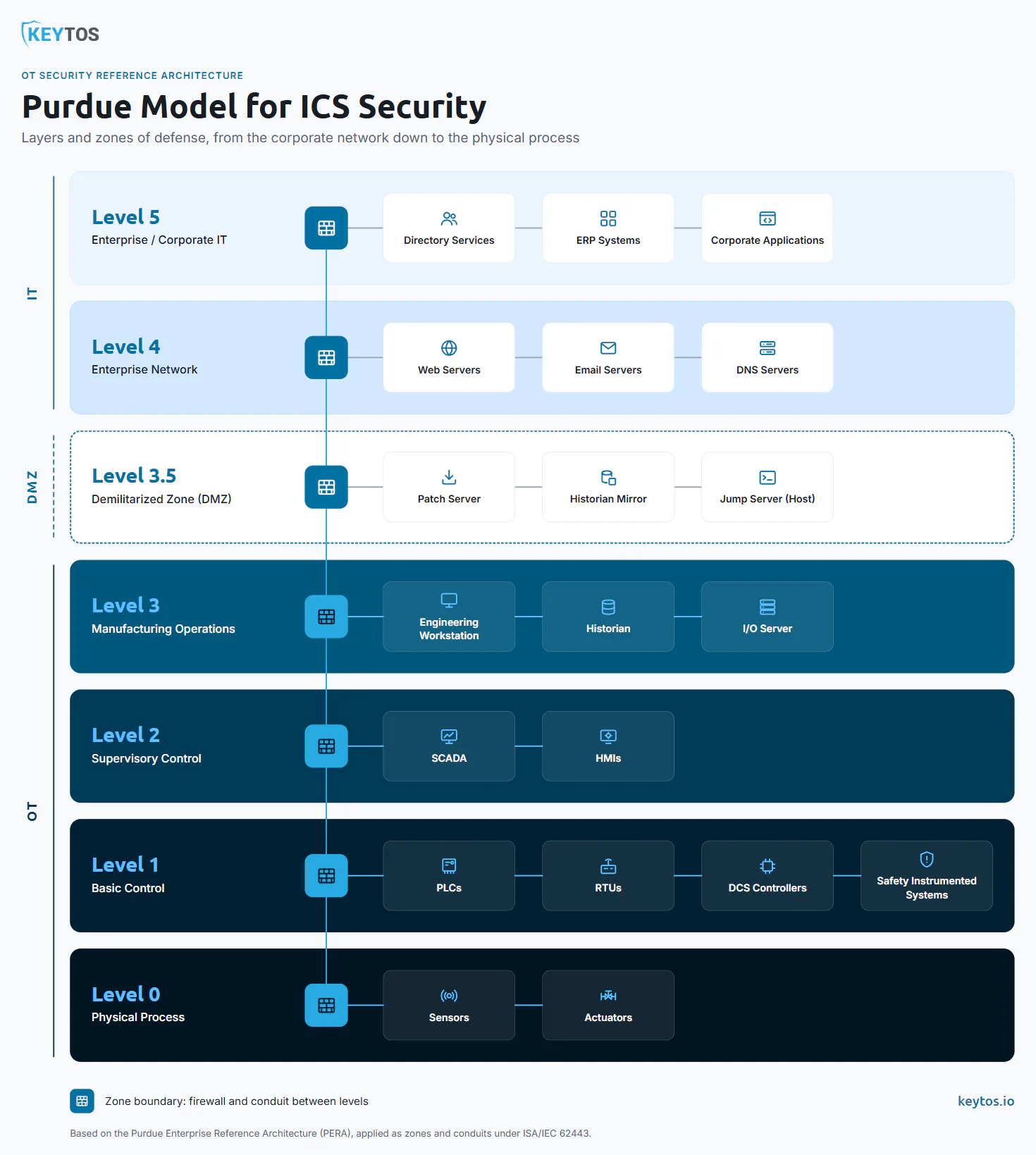
The whole point of the model is that traffic between those levels should be deliberate and controlled. The ISA/IEC 62443 series formalizes the same idea as zones (groups of assets with the same security requirements) and conduits (the controlled paths between them). Wi-Fi is where that model usually falls apart, because a radio doesn’t care which Purdue level you meant to put a device in. If a device knows the PSK, it’s on the network.
What Types of Devices Run in OT Networks?
Not every OT device uses Wi-Fi, and not every Wi-Fi OT device is capable of modern authentication. Before you design anything, you need to know what you actually have. Here are the device types we see most often on Wi-Fi OT networks:
- Mobile computers and handheld scanners - rugged devices (usually Android) used for inventory, picking, and work orders. These are pretty easy to secure, since most current devices support WPA2/WPA3-Enterprise and EAP-TLS certificate-based authentication.
- AGVs and AMRs (autonomous mobile robots) - robots that move material around the floor and rely on Wi-Fi roaming for fleet management. They are very sensitive to authentication delays during roaming.
- HMI tablets and operator panels - wireless operator interfaces that talk directly to PLCs and SCADA. These are high-value targets because they can change the process.
- Wireless PLC and remote I/O bridges - industrial Wi-Fi client modules and bridges that connect PLCs, cranes, and rotating equipment where cabling isn’t practical.
- Wireless sensor gateways - the gateways that collect data from WirelessHART, ISA100.11a, or proprietary sensor meshes and forward it over Wi-Fi or Ethernet.
- IP cameras and badge readers - physical security devices that often live on the OT side of the house.
- Building automation - HVAC controllers, smart lighting, and energy meters.
- Vendor and contractor laptops - the device type that worries me most, because it shows up unannounced, connects to whatever network the vendor was told to use, and leaves with your PSK.
One important note: field-level wireless protocols like WirelessHART and ISA100.11a run on IEEE 802.15.4, not Wi-Fi, and handle their own join security through the network manager. RADIUS doesn’t protect the mesh itself, but it absolutely should protect the gateway that bridges that mesh onto your IP network.
The practical question for each device type is: what is the strongest authentication this device supports? Sort your inventory into three buckets, because each one gets a different treatment later:
| Bucket | Supports | Examples | RADIUS Method |
|---|---|---|---|
| Certificate-capable | 802.1X with EAP-TLS | Modern handhelds, AMRs, HMI tablets, newer industrial Wi-Fi clients | EAP-TLS with device certificates |
| Password-capable | 802.1X with PEAP or EAP-TTLS only | Older handhelds, some industrial clients | Per-device credentials, separate policy |
| Legacy | PSK only, no 802.1X | Older sensors, cameras, cheap IoT, some bridges | MAC Authentication Bypass on an isolated SSID |
How Does a RADIUS Server Protect OT Networks?
If you need a refresher on the protocol itself, check out what RADIUS is and how it works. For OT, RADIUS does three things that a shared PSK fundamentally can’t.
1. Every OT Device Gets Its Own Identity
With WPA2/WPA3-Personal, every device on the SSID shares the same secret. If a contractor writes it down, or someone pulls it off a decommissioned scanner, you have to re-key every device on the floor, which in OT means scheduling downtime. So in practice, nobody rotates it.
With 802.1X and RADIUS (WPA2/WPA3-Enterprise), each device authenticates with its own credential. The strongest option is EAP-TLS, where the device proves its identity with an X.509 certificate and private key. There is no password to steal, phish, or write on a sticky note on the side of the HMI. If you want to go deeper into the protocol options, we break down the difference between EAP-TTLS and EAP-TLS and how Wi-Fi certificate authentication works.
2. You Can Revoke a Single OT Device Without Touching the Rest
When a handheld goes missing or an AMR is decommissioned, you revoke that one certificate (or remove that one MAC address), and the device is off the network on its next authentication. Every other device on the line keeps running. Compare that to a PSK, where cutting off one device means re-keying all of them. For an environment that prioritizes availability above everything else, this is the single biggest operational argument for RADIUS.
3. RADIUS Decides in Which VLAN Each OT Device Lands
RADIUS isn’t just a yes/no gate. The RADIUS server’s response tells the access point which VLAN to put the device on, using the standard RFC 3580 tunnel attributes:
Tunnel-Type=13(VLAN)Tunnel-Medium-Type=6(802)Tunnel-Private-Group-ID= the VLAN ID
That means one physical Wi-Fi infrastructure can safely carry both OT and IT traffic, because the authentication result decides the network segment, not which SSID the user happened to pick. We’ll put that to work in the next section.
RADIUS Provides a Central Audit Trail for OT Device Authentication
Every authentication attempt (successful or not) is logged in one place, including which device tried to connect, from which access point, and which policy it matched. When an auditor asks “what devices were on the packaging line Wi-Fi in March?”, you have an answer. That matters for IEC 62443, CMMC, and NERC CIP alike.
RADIUS Has Its Limits
RADIUS controls who gets on and where they land. It doesn’t inspect traffic once a device is connected, and it doesn’t replace the firewall between your zones. A compromised but properly authenticated device is still a compromised device. RADIUS is your front door, and the firewall rules between VLANs are the walls inside the building. You need both.
How to Isolate OT Networks From Corporate Networks Using RADIUS
Here is the architecture we recommend for isolating Wi-Fi OT networks from your corporate network using RADIUS. At a high level the goal is a corporate device can never land on an OT VLAN, an OT device can never land on a corporate VLAN, and legacy devices land in a box they can’t get out of.
Step 1: Define Your OT Zones and VLANs
Start on paper. Map your device inventory from the previous section to zones, and give each zone its own VLAN. A typical starting point for a manufacturing site looks like this:
| VLAN | Zone | Who Lands Here | Allowed To Reach |
|---|---|---|---|
| 10 | Corporate | Entra ID-joined laptops and phones | Internet, Microsoft 365, corporate apps |
| 200 | OT Operations | HMI tablets, handhelds, AMRs (EAP-TLS) | Specific SCADA/MES servers on specific ports |
| 210 | OT Engineering | Engineering workstations (EAP-TLS + group) | PLCs, through a jump host or IDMZ |
| 250 | OT Legacy | MAB devices | Only their one controller or gateway |
| 999 | Quarantine | Failed policy or unknown device | Nothing |
Then write the firewall rules between those VLANs before you turn on the Wi-Fi. Default deny between zones, with explicit allow rules for the specific hosts and ports each zone needs. Traffic between OT and IT should only cross through the IDMZ at Purdue Level 3.5, never directly.
Step 2: Use a Dedicated Certificate Authority for OT Devices
It’s important to separate the trust boundaries for corporate and OT devices. If your corporate devices and your OT devices get certificates from the same CA, then the RADIUS policy that trusts that CA can’t tell them apart by the certificate chain alone. Create a separate issuing CA just for OT devices.
With EZCA, our cloud PKI, spinning up an additional CA takes only a few minutes, and you can issue OT device certificates through SCEP from your MDM or rugged-device management tool, EST for IoT deployment, or by CSR for devices that need a manual enrollment during commissioning. Your corporate devices keep getting their certificates from the corporate CA through Intune, as described in our guide to EAP-TLS Wi-Fi certificate authentication.
Separate issuing CAs let RADIUS policies distinguish OT device certificates from corporate certificates when each policy explicitly restricts its trusted issuer. The OT Engineering policy below is a controlled exception: it accepts corporate certificates for devices authorized through the engineering group.
Step 3: Create RADIUS Policies That Map Identity to VLANs
Next, create one RADIUS policy per zone. In EZRADIUS, our cloud RADIUS service, each policy can match on several conditions at once and return a VLAN assignment:
- OT Operations policy - trusts only the OT issuing CA, matches the OT SSID through the
Called-Station-Idattribute, and returns VLAN200. - OT Engineering policy - trusts the corporate CA, but requires the device certificate to map to a workstation device object in an “OT Engineers” Entra ID device group and, optionally, to be compliant in Intune. Returns VLAN
210. To revoke a workstation’s access, remove its device object from the group, not the engineer’s user account. EZRADIUS evaluates membership at authentication, but caches membership briefly, so allow for a delay of a few minutes before the change takes effect on a subsequent authentication. - Corporate policy - trusts the corporate CA, matches the corporate SSID, returns VLAN
10.
Notice that the engineering workstation case is where a cloud-native RADIUS really earns its keep. “Only workstations in the designated Entra ID device group can reach the PLC VLAN, with Intune compliance enforced when configured” is a policy that is painful to build with on-premises NPS, which also doesn’t work with cloud-only Entra ID devices to begin with.
Step 4: Quarantine Legacy OT Devices With MAC Authentication Bypass
You will have devices that can’t do 802.1X. Don’t let them be the reason the whole OT network stays on a PSK. Instead, put them on a separate legacy SSID and use MAC Authentication Bypass (MAB) so that only MAC addresses you’ve registered are allowed on, and each one lands in the locked-down legacy VLAN. In EZRADIUS, you can bulk upload MAC addresses from a CSV, which is handy when you’re onboarding a whole line of devices from an asset inventory export.
A word of caution: MAC addresses can be spoofed, so treat MAB as segmentation, not authentication. Restrict each legacy device to the controller or gateway it actually needs. Inter-VLAN firewall rules alone do not block communication between devices sharing VLAN 250: also configure intra-VLAN enforcement, such as WLAN client isolation with equivalent switch isolation where needed, per-device access rules, or separate segments. Validate that this blocks peer-to-peer traffic across access points and wired connections while preserving required controller traffic. Most Wi-Fi controllers handle MAB as “MAC authentication with RADIUS” on a PSK SSID, so you still keep the PSK for encryption, and RADIUS decides whether that MAC is allowed and where it goes. Plan to replace these devices with 802.1X-capable models during your next hardware refresh.
Step 5: Send Everything Else to Quarantine
Finally, reject devices that fail authentication, including devices with invalid or revoked certificates. If a device successfully authenticates but does not meet the authorization requirements for an OT or corporate VLAN, an explicit fallback RADIUS policy can return an Access-Accept assigning VLAN 999, with no routes to protected networks. A quarantine VLAN is not a way to admit devices that failed EAP-TLS authentication.
Best Practices for Running RADIUS in OT Environments
OT has a few requirements that IT Wi-Fi doesn’t, so keep these in mind:
- Don’t let the WAN become a single point of failure. If your plant loses its internet connection, your AMRs still need to roam between access points. Use a cloud RADIUS service with a local RADIUS proxy for redundancy so authentication keeps working on-site during an outage.
- Use RadSec for over the WAN when using legacy protocols. Classic RADIUS over UDP relies on MD5, and the 2024 Blast-RADIUS vulnerability (CVE-2024-3596) showed that an attacker in the network path can forge responses. RadSec wraps RADIUS in TLS and closes that gap. Classic RADIUS can still be a great option if you’re only doing EAP-TLS.
- Tune for roaming. Robots and handhelds roam constantly. Enable fast roaming (802.11r / OKC) on your controller so devices don’t do a full EAP exchange on every access point handoff.
- Monitor certificate expiration. An expired certificate on a scanner is an annoyance, but an expired certificate on 40 AMRs at 2 AM is an outage. Use certificate lifetimes that match your maintenance windows and alert well before expiry.
- Review your audit logs. Repeated failed authentications on the OT SSID from an unknown MAC address are worth investigating, not ignoring.
- Get rid of shared PSKs one bucket at a time. Start with the certificate-capable devices, which are usually the majority. Don’t wait until every legacy device is solved before moving the rest.
If you’re also thinking about this from a broader network access control angle, we’ve covered what makes the best cloud NAC for Entra ID and how it fits into a zero-trust network access strategy. And if you’re dealing with medical devices instead of manufacturing equipment, the same principles apply. See our post on IoT for healthcare compliance.
Wi-Fi OT Network Security FAQs
Can I use the same Wi-Fi infrastructure for OT and IT?
Yes, as long as RADIUS assigns VLANs based on device identity and your firewall enforces default deny between the OT and IT VLANs. Many sites still choose physically separate access points for safety-critical OT zones, which is a perfectly reasonable defense in depth decision.
Do OT devices need to be joined to Entra ID or managed by Intune?
No. Most OT devices have no user and no MDM. With EAP-TLS, the device only needs a certificate from a CA your RADIUS server trusts. Entra ID group and Intune compliance checks are most useful for the human-operated devices, like engineering workstations, that cross into OT zones.
Is MAC Authentication Bypass secure enough for OT?
On its own, no. MAC addresses are easy to spoof. MAB is useful for keeping unregistered devices off the network and putting legacy devices into an isolated VLAN, but the real security comes from what that VLAN is allowed to reach.
What happens to my OT devices if the cloud RADIUS service is unreachable?
Devices that are already connected normally stay connected until they need a full re-authentication; fast roaming may use cached keys. For certificate-only OT policies that do not require Entra ID or Intune checks, deploy a local RADIUS proxy at each site to support authentication during a WAN outage. Policies that require Entra ID group or Intune compliance checks still depend on internet connectivity, so validate their outage behavior before deployment.
Secure Your Wi-Fi OT Network With Keytos
Securing Wi-Fi OT networks using RADIUS comes down to three things: give every device its own identity, let the RADIUS server decide where each device lands, and make sure the walls between those VLANs actually hold. EZRADIUS and EZCA give you the cloud RADIUS and cloud PKI to do it, without standing up NPS or ADCS servers in your plant. Prefer a single bundle? Keytos Shield packages both into one cloud NAC.
If you want help mapping your OT device inventory to zones and policies, schedule a FREE call with one of our identity experts. We’re happy to walk through your environment with you.
Get Started With EZRADIUS Cloud RADIUS