How Does Intune Issue SCEP Certificates with EZCA?
What is SCEP?
SCEP, or Simple Certificate Enrollment Protocol (SCEP), is a certificate enrollment standard that enables devices to issue certificates by using a key provided by a 3rd party. The Certificate Authority (CA) must be able to communicate with this trusted third party (in this case Intune) to validate that the key provided by the device is allowed to request a certificate.
When are SCEP Certificates Used?
SCEP certificates are commonly used in scenarios where devices need to authenticate to a network or service without user interaction. For example, SCEP certificates can be used for:
- Wi-Fi Authentication: Devices can use SCEP certificates to authenticate to secure Wi-Fi networks using EAP-TLS.
- VPN Access: SCEP certificates can be used to authenticate devices to VPNs, allowing secure remote access to corporate resources.
- Email Encryption: SCEP certificates can be used to encrypt and sign emails, ensuring secure communication.
- Device Authentication: SCEP certificates can be used for device authentication to various services, ensuring that only trusted devices can access sensitive resources.
How Does Intune Issue SCEP Certificates?
Microsoft Intune does not directly issue certificates for SCEP profiles. Instead, it relies on a Certificate Authority (CA) to issue the certificates on its behalf. This CA can be an on-premises CA, such as Microsoft ADCS, or a cloud-based CA like EZCA. These CAs connect to Intune using its Third Party APIs to issue and manage SCEP certificates for Intune-managed devices.
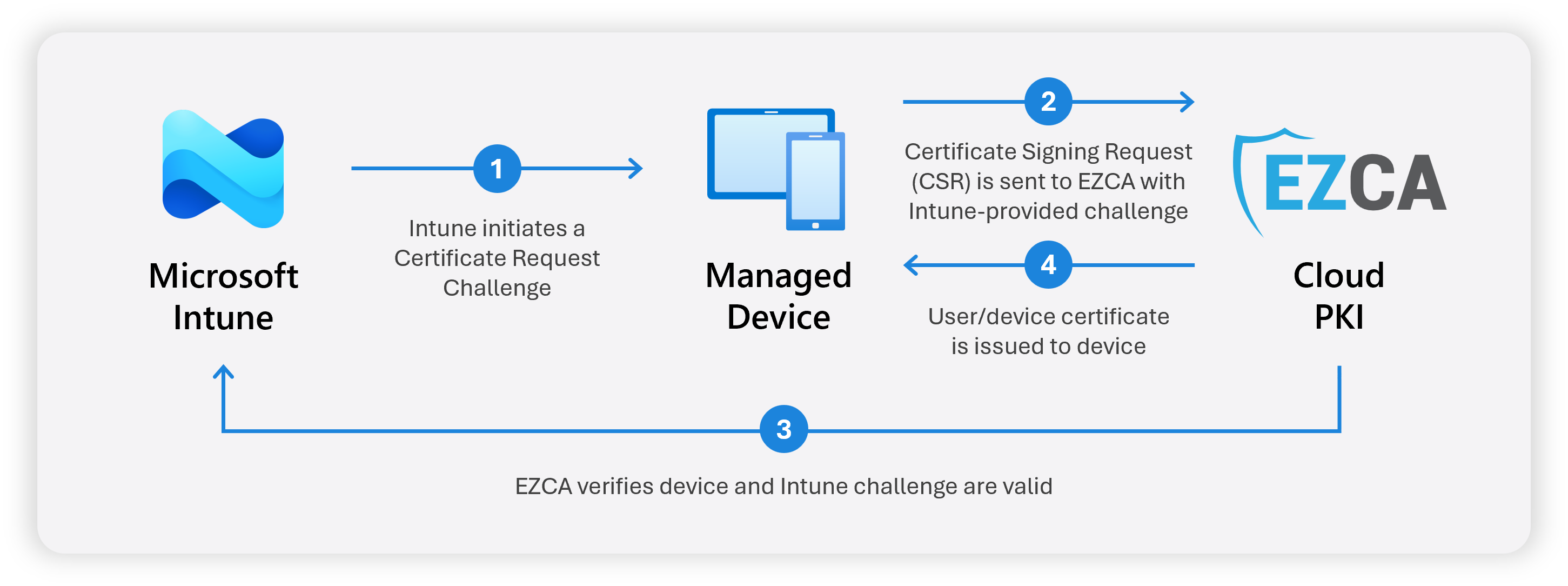
When you create a SCEP profile in Intune and assign it to your users and/or devices:
- Intune sends a Certificate Request Challenge to the managed device.
- The managed device creates a private key and a Certificate Signing Request (CSR), and sends it with the Intune challenge to EZCA.
- EZCA validates the request with Intune to ensure the device and challenge are valid.
- EZCA issues the certificate and returns the signed certificate to the device.
This way the private key is generated on and never leaves the device, and the certificate is issued securely by EZCA on behalf of Intune.
How Do I Create a SCEP CA for Intune?
If you already have an on-premises Active Directory with an ADCS CA, Microsoft has a guide on how to configure the required services to issue certificates with Intune SCEP.
If you do not have an on-premises CA, or if you want a simpler solution without the need to manage additional infrastructure, you can use EZCA as your SCEP CA for Intune. EZCA is a cloud-based CA that is fully integrated with Microsoft Intune, allowing you to easily set up and issue SCEP certificates to your devices without the need for complex configurations or additional infrastructure.
How are SCEP Certificates Revoked When a Device is Retired or a User Leaves?
When an employee leaves the company or a device is compromised, it is important to revoke the certificates issued to them. EZCA automatically revokes SCEP certificates when the device or user is removed from Intune (usually within a few hours). However, certificate revocation only takes effect once the Certificate Revocation List (CRL) is updated and distributed. Depending on how your SCEP CA is configured, this process can take days. Note that if you use OCSP, revocation can be checked in real-time, although very few applications support OCSP for SCEP certificates.
If you need to manually revoke a SCEP certificate prior to the automatic revocation, you can do so by following these steps outlined in this guide.
Despite a revoked certificate remaining valid until the CRL is updated, Entra ID can block login attempts using Conditional Access from users or devices that have been deleted or disabled, even if their certificates are still technically valid. Make sure to evaluate your security requirements and implement Entra ID Conditional Access policies for a defense-in-depth approach to securing access.
Additionally, if you are using EZRADIUS for your network access with EZCA SCEP certificates, disabled or deleted users and devices can be blocked from accessing the network immediately, if you have enabled “Match With Entra ID Objects” in your EZRADIUS Access Policy.
Next Steps
If you’re ready to set up your SCEP CA for Intune, follow this guide to create your Intune SCEP CA with EZCA and start issuing certificates to your devices:
Create Intune SCEP CA