














How-To: Automatically Renew an X509 SSL Certificate
Why Certificates Should Be Automatically Renewed
By design, certificates have an expiration date. When a certificate is approaching its expiration date, it is necessary to renew it to not lose access to the resources the certificate was used to authenticate to. Over 80% of organizations have reported a certificate related outage in the past two year. As the number of certificates an organization has increases, the risk of an outage increases exponentially. To avoid this, it is necessary to have an automatic certificate renewal process in place. While many protocols such as ACME and SCEP take care of automatically rotating certificates, EZCA has other tools that can help you automate the certificate lifecycle for certificates that are not issued through these standards.
If your certificate is not stored in a location that supports auto-renewal, or if you have a certificate that was created manually through a CSR or directly in the portal, you can still renew your certificate manually through the EZCA Portal or by using the EZCA Certificate Manager Tool. Refer to the section below for instructions on how to do this.
Email alerts will be sent to all Domain Owners, Requesters, and Approvers for every Domain associated with the certificate when the certificate is approaching expiration and needs to be renewed. While this can help reduce the risk of an outage, it is not a reliable method to ensure that certificates are renewed on time, especially for organizations with a large number of certificates. To ensure that your certificates are always up to date and to minimize the risk of an outage, it is recommended to set up automatic renewal for your certificates whenever possible.
What Certificate Stores Does EZCA Support for Auto-Renewal?
For a certificate to be able to be auto-renewed by EZCA, the certificate needs to be stored in a location that EZCA supports for auto-rotation. Currently, EZCA supports auto-rotation of certificates stored in the following locations:
| Type | Description | Supports Auto-Renewal |
|---|---|---|
| Windows Certificate Store | Using the EZCA Certificate Manager Tool, you can set up a scheduled task to automatically renew certificates stored in the Windows Certificate Store. The tool requests a new certificate from EZCA and installs it in the Windows Certificate Store, replacing the old certificate. | Yes, via EZCA Certificate Manager |
| Linux Certificate Store | Using the EZCA Certificate Manager Tool, you can set up a cron job to automatically renew certificates stored in the Linux Certificate Store. The tool requests a new certificate from EZCA and installs it in the Linux Certificate Store, replacing the old certificate. | Yes, via EZCA Certificate Manager |
| macOS Keychain | Using the EZCA Certificate Manager Tool, you can set up a launchd job to automatically renew certificates stored in the MacOS Keychain. The tool requests a new certificate from EZCA and installs it in the MacOS Keychain, replacing the old certificate. | Yes, via EZCA Certificate Manager |
| Azure Key Vault | EZCA can connect to Azure Key Vault and automatically issue a new version of the certificate in Key Vault and update the secret with the new version. The old version is kept until the user decides to delete it. | Yes, via direct renewal |
| Entra ID Application Registrations | If you manage Entra ID Application Registration certificates in EZCA, you can configure the application registration to automatically renew certificates issued by EZCA when they are approaching expiration. | Yes, via direct renewal |
| Azure IoT | EZCA can automatically renew certificates used for Azure IoT Hub devices, ensuring that your IoT devices maintain secure communication with the IoT Hub without manual intervention. | Yes, via direct renewal |
| ACME Clients | If you are using an ACME client that supports EZCA as an ACME CA, you can configure the ACME client to automatically renew certificates issued by EZCA as they approach expiration. | Yes, via ACME protocol |
| SCEP Clients | If you are using a SCEP client that supports EZCA as a SCEP CA, you can configure the SCEP client to automatically renew certificates issued by EZCA as they approach expiration. Requires an EZCA SCEP CA, which uses a different template than SSL CAs. | Yes, via SCEP protocol |
| CSR/Manually-Issued Certificates | Certificates that are created manually through a Certificate Signing Request (CSR) or directly in the EZCA Portal do not have an auto-renewal option. To renew these certificates, you will need to manually request a new certificate through the portal or by submitting a new CSR. | No |
How to Set Up Auto-Renewal for Certificates in EZCA
Refer to the guides below to set up auto-renewal for your certificates in EZCA based on the location where your certificates are stored:
Using the EZCA Certificate Manager Tool, you can create a Scheduled Task in Windows, a cron job in Linux, or a launchd job in MacOS to periodically run the renew command for the certificates you want to auto-renew. The renew command will request a new certificate from EZCA and install it in the respective certificate store, replacing the old certificate. You can set the frequency of the scheduled task, cron job, or launchd job to determine how often the tool checks for certificates that are approaching expiration and renews them.
Refer to the commands below for the specific command(s) to use for renewing certificates with the EZCA Certificate Manager Tool.
Refer to the Azure Key Vault guide for instructions on how to set up auto-renewal for certificates stored in Azure Key Vault.
Refer to the Entra ID Application Registrations guide for instructions on how to set up auto-renewal for certificates used in Entra ID Application Registrations.
Refer to the Azure IoT guide for instructions on how to set up auto-renewal for certificates used for Azure IoT Hub devices.
Refer to the ACME Setup guide for instructions on how to set up auto-renewal for certificates issued by EZCA through an ACME client.
Refer to our SCEP CA documentation for instructions on how to set up your SCEP profiles in your preferred Mobile Device Management (MDM) solution to automatically renew certificates issued by an EZCA SCEP CA.
How To Automatically Renew a Certificate in EZCA
Once a supported certificate store and its certificates are set for auto-renewal, EZCA will take care of the renewal automatically and will email the domain owners when the certificate is renewed. There is no manual action required for the domain owners to take to renew the certificate. The new certificate will be issued and installed in the same location as the previous certificate.
Once you set up auto-renewal for your certificates, you can set it and forget it. EZCA will take care of the renewal process and will ensure that your certificates are always up to date. As long as your downstream applications are configured to use the certificate location that EZCA is renewing the certificate in, you will not have to do anything to keep your applications up and running with valid certificates.
How to Manually Renew a Certificate in EZCA
If you want to manually renew a certificate before its expiration date, you can do so by following the steps below. This is useful when you want to rotate a certificate before its expiration date or if you want to rotate a certificate that does not exist in an auto-renewal certificate store.
To renew a certificate, you need to be an Approved Requester for all of the domains contained in the certificate, including the Subject and all Subject Alternative Names (SANs). If you are not an Approved Requester, you will not be able to renew the certificate and will have to request access from an administrator.
How to Renew a Certificate via the EZCA Portal
Follow the steps below to manually renew a certificate via the EZCA Portal. Note that only the following certificate stores can be renewed through the EZCA Portal:
- Azure Key Vault
- Entra ID Application Registrations
- Local/manual certificates issued via a Certificate Signing Request (CSR) or created directly in the portal
EZCA Certificate Manager, ACME, and other supported certificate stores use a “pull” model for auto-renewal, where the certificate manager tool or client periodically checks for certificates that are approaching expiration and renews them. For these certificate stores, you will not be able to renew them through the portal, but you can trigger a renewal by running the certificate manager tool or client.
-
Navigate to https://portal.ezca.io/
-
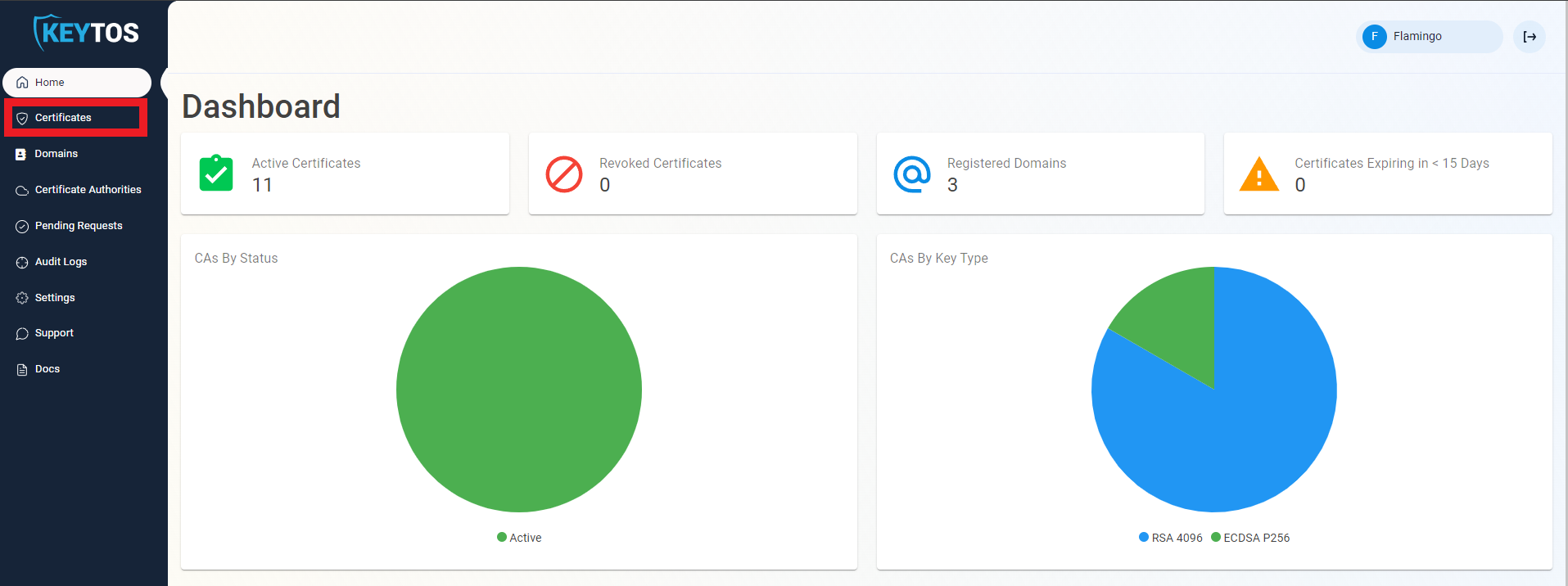
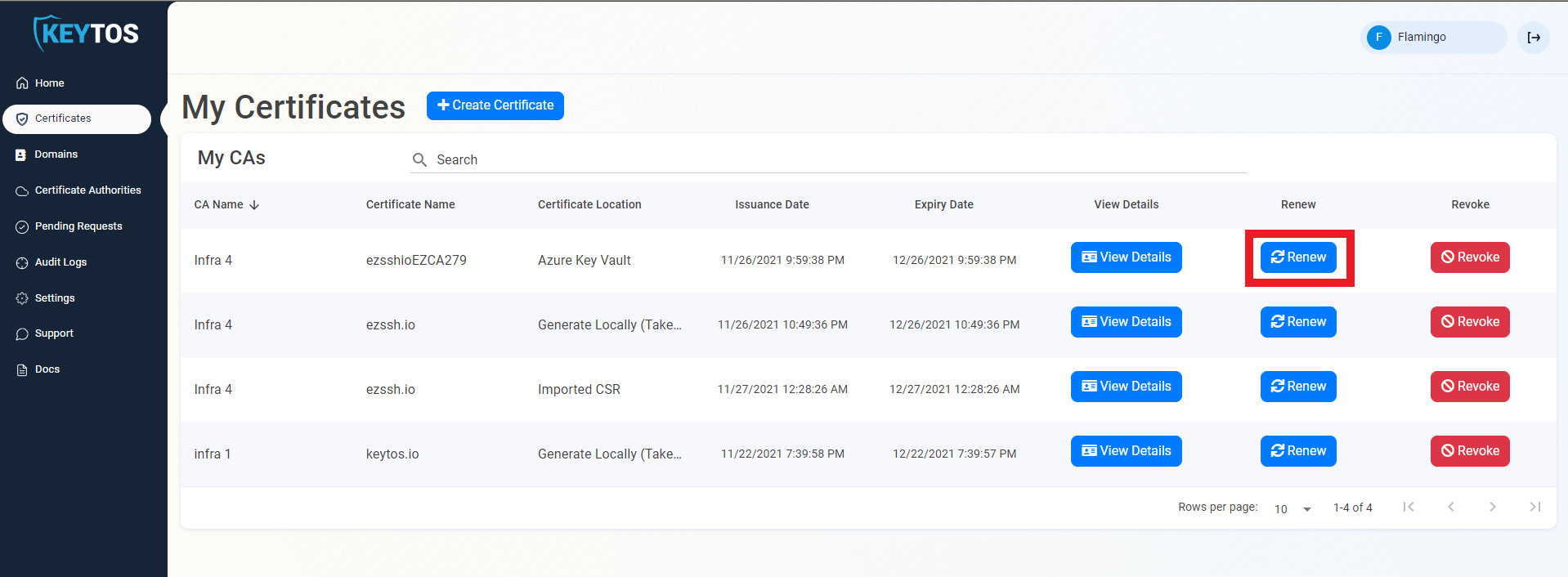
Navigate to Certificates.
-
Click the Renew button for the certificate you want to renew.
-
For Key Vault and Entra ID Application Registration certificates, the certificate will be automatically renewed and installed in the same location as the previous certificate.
-
For manually created certificates (CSR, browser-based), you will be taken to the create certificate screen where you can choose your preferred method to create a new certificate. Once the new certificate is created, you will need to install it in all the locations where the previous certificate was being used.
How To Renew a Certificate Using the Certificate Manager Tool
If you have a certificate that is not stored in a location that EZCA supports auto rotation of certificates, as long as you are in a Windows, MacOS, or Linux environment, you can use the certificate manager tool to renew the certificate. To do this, you have two options:
How to Renew a Single Certificate Using the Certificate Manager Tool
The certificate manager tool download is a command line tool that allows you to renew the certificates with just the existing certificate (no need for Entra ID users). To renew a certificate using the certificate manager tool, you can run the following command:
.\EZCACertManager.exe renew -s "mydomain"
How to Renew All Certificates Issued by a CA Using the Certificate Manager Tool
The certificate manager tool also allows you to renew all the certificates issued by a CA. This is useful when you have multiple certificates issued by the same CA in the same location and you want to renew all of them, or if you want to push the command to all the machines that have certificates issued by a specific CA (such as through GPO), to Renew all the certificates issued by a CA, you can run the following command:
Sample call:
.\EZCACertManager.exe renewAll -a myIssuingCASubjectKey
where the myIssuingCASubjectKey is the Subject Key of the Issuing CA of the certificates you want to renew. This can be found in the certificate details of the CA certificate. If you want to include multiple CAs, separate the values with a comma.
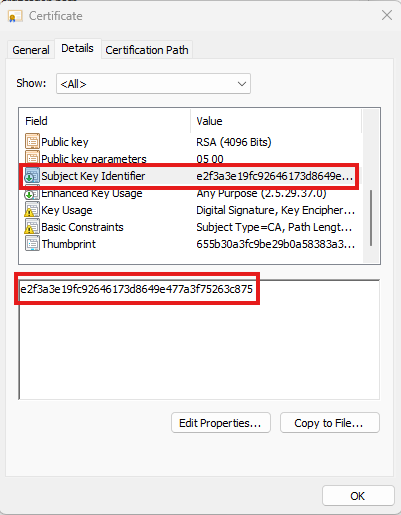
Same as the other commands, if you want to do this at the local store level, you must add --LocalStore (we don’t have to add the RDP flag here since this command will check if the certificate was used for RDP before and if it was, it will set the renewed certificate for RDP as well):
.\EZCACertManager.exe renewAll -a myIssuingCASubjectKey --LocalStore
How To Renew an SSL Certificates in C#
In Keytos our goal is to make PKI services as easy to use for every person in the world. One way to make this a reality is by removing humans as much as possible from the equation. To help companies achieve this goal, we have created a sample C# console application that uses a certificate from the local certificate store in windows to authenticate with EZCA and requests a new certificate. See Sample Code
C# Sample Code for Certificate Renewal