How-To: Issue SCEP Certificates with Mobile Device Management (MDM)
Learn how to use popular mobile device management (MDM) platforms such as Intune, Jamf, and ManageEngine to issue certificates to your managed devices via your SCEP CA.
What is Mobile Device Management (MDM)?
Mobile Device Management (MDM) refers to platforms and tools that allow organizations to manage, secure, and monitor devices such as smartphones, tablets, and laptops. MDM solutions enable IT administrators to enforce security policies, deploy applications, and manage device configurations remotely.
How Does MDM Push Certificates to Devices?
There are two types of certificates that can be issued to devices via MDM: trusted certificates and SCEP certificates. Trusted certificates are typically used to establish trust for applications or services via a trusted certificate authority (CA) certificate, while SCEP certificates are individual leaf certificates used for authentication, encryption, and other security purposes on the device, which are unique to each device.
MDM platforms typically use Simple Certificate Enrollment Protocol (SCEP) to facilitate certificate issuance to managed devices. When a device enrolls in an MDM solution, the device can request a certificate from a SCEP Certificate Authority (CA) configured within the MDM platform, such as EZCA.
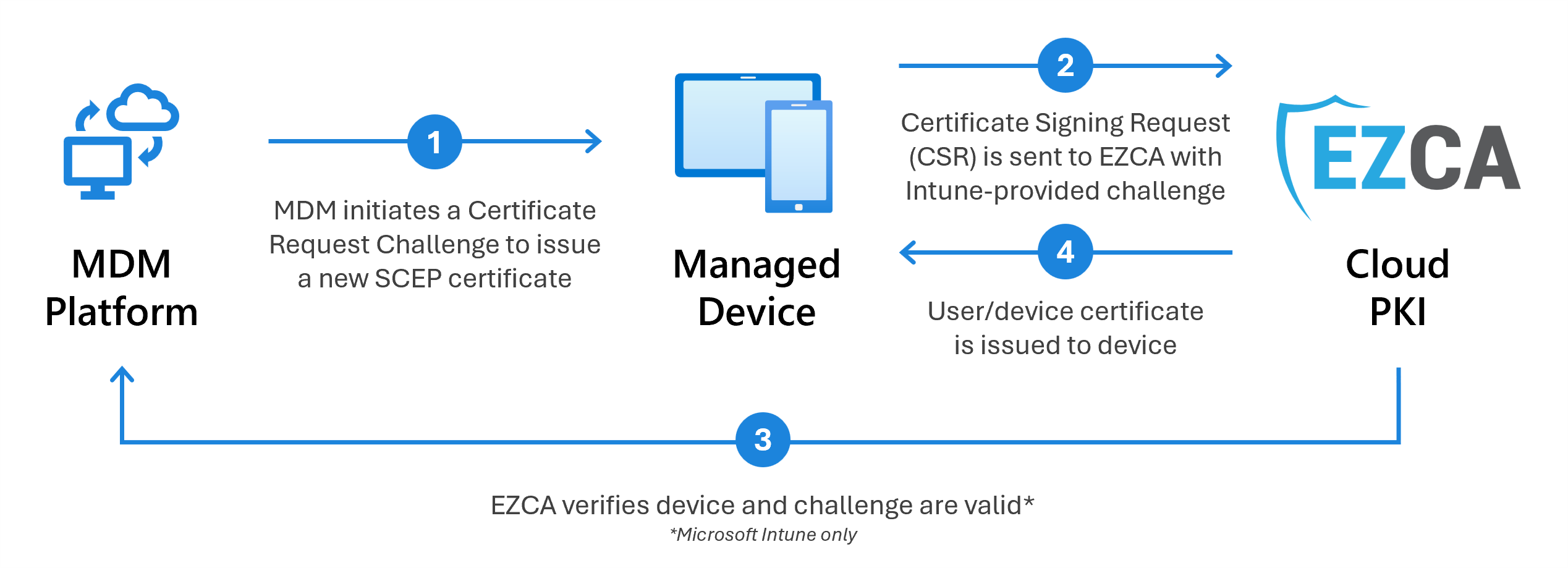
While EZCA is designed to work with any MDM platform that supports SCEP, we have tested and verified compatibility with the following popular MDM solutions:
Learn how to leverage EZCA’s built-in Microsoft Intune integration to automatically issue SCEP certificates to your managed devices, ensuring secure access and compliance with your organization’s policies.
Learn how to issue SCEP certificates to devices in Jamf using an EZCA SCEP CA
Learn how to issue SCEP certificates to devices using NinjaOne and an EZCA SCEP CA
Learn how to issue Apple Configuration profiles with SCEP certificates to devices using SimpleMDM and an EZCA SCEP CA
Learn how to issue SCEP certificates to devices using Apple Configurator and an EZCA SCEP CA
Learn how to issue SCEP certificates to devices using iMazing Profile Editor and an EZCA SCEP CA
EZCA Allows you to create and manage your own PKI in Azure. In this page we will go over how to connect your CA to Manage Engine MDM (Mobile Device Manager) Plus.
Learn how to manually issue SCEP certificates to devices using tooling and scripts with an EZCA SCEP CA