












How-To: Distribute Network Profiles and Configuration to Your Users
How Do I Connect My Devices to an Enterprise 802.1X Network Using RADIUS Authentication?
Connecting to an enterprise 802.1X network isn’t as easy as just clicking on the Wi-Fi network and connecting, even if you have the right credentials. Enterprise networks require that certificates and network profiles be distributed to end-devices in order to connect securely to the network using RADIUS authentication. For most organizations, this is done using a Mobile Device Management (MDM) solution like Microsoft Intune or Jamf Pro.
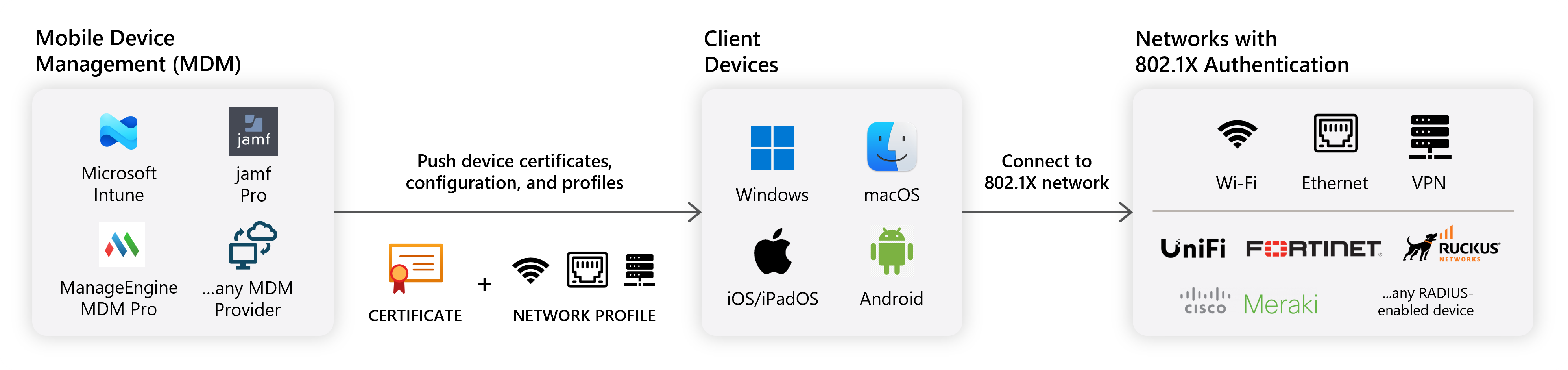
However, you may have a large number of devices that are not managed by an MDM, or you may want to allow users to self-serve their own network profiles. This is where the EZRADIUS Self-Service Wi-Fi portal comes in. Looking to only configure a few devices? You can also manually configure your devices without the need of an MDM or the Self-Service Wi-Fi portal.
What are the Prerequisites Before I Can Push Network Profiles to My Users?
Before you can push network profiles to your users, ensure you have completed the following:
- Register the Keytos applications in your tenant
- Create an EZRADIUS subscription
- Add your Subscription Owners or Network Administrators
What Mobile Device Management (MDM) Solutions Can I Use to Push Network Profiles to My Users?
While EZRADIUS supports any Mobile Device Management (MDM) solution that can push certificates and network profiles to your devices, we have tailored guides for the following MDM solutions:
Can I Connect Non-Managed Devices to My Enterprise Network Using RADIUS Authentication?
Yes! If you have devices that are not managed by an MDM, you can still connect them to your enterprise network using RADIUS authentication by using the EZRADIUS Self-Service Wi-Fi portal. This portal allows users to download their own network profiles and certificates to connect to the network without the need for an MDM.
If you only have a few devices to connect, you can also manually configure your devices without the need of an MDM or the Self-Service Wi-Fi portal.