













How-To: Control RADIUS Policies and Behavior for BYOD/Personal Devices
Overview - How to Control RADIUS Policies and Behavior for BYOD/Personal Devices
In this pattern, you can have separate RADIUS policies for BYOD and corporate-owned devices. This approach allows you to segment your network and VLANs based on device ownership, enhancing security and ensuring that corporate-owned devices have access to the resources they need while restricting personal BYOD devices.
How Are Devices Evaluated for Ownership?
There are a couple different ways to separate BYOD devices from corporate-owned devices in EZRADIUS, depending on how you want to evaluate device ownership:
- Separate SSID for BYOD Devices: You can create a separate SSID, or network name, for your BYOD devices. That way, any device that connects to the BYOD SSID is automatically placed in the BYOD VLAN, while devices that connect to the corporate SSID are placed in the corporate VLAN.
- Entra ID (EAP-TTLS) vs. Certificate-Based (EAP-TLS) Authentication: If you want to use Entra ID authentication for BYOD devices and certificate-based authentication for corporate-owned devices, you can create separate access policies in EZRADIUS that check the authentication method used. Devices that authenticate using Entra ID would be classified as BYOD and placed in the BYOD VLAN, while devices that authenticate using certificates would be classified as corporate-owned and placed in the corporate VLAN.
Let’s explore each of these approaches in more detail so you can determine which one is the best fit for your organization.
Methods for Evaluating Device Ownership
Using a separate SSID for BYOD devices is often the simplest way to separate BYOD devices from corporate-owned devices. By creating a dedicated SSID for BYOD devices (Contoso-Internet) and another SSID for corporate-owned devices (Contoso-Corp), you can easily apply different RADIUS policies and VLAN assignments based on the SSID that a device is connecting to. This method does not require any special configuration on the devices themselves, as the network infrastructure will handle the separation based on the SSID.
Refer to our Match on SSID Name reference architecture for detailed implementation steps for this approach.
Using different authentication methods for BYOD and corporate-owned devices is another effective way to separate device ownership. For example, you can require corporate-owned devices to use certificate-based authentication (EAP-TLS) while allowing BYOD devices to use Entra ID authentication (EAP-TTLS). By creating separate access policies in EZRADIUS that check the authentication method used, you can classify devices as BYOD or corporate-owned based on how they authenticate and apply different VLAN assignments accordingly.
To implement this approach, you can create two access policies in EZRADIUS:
-
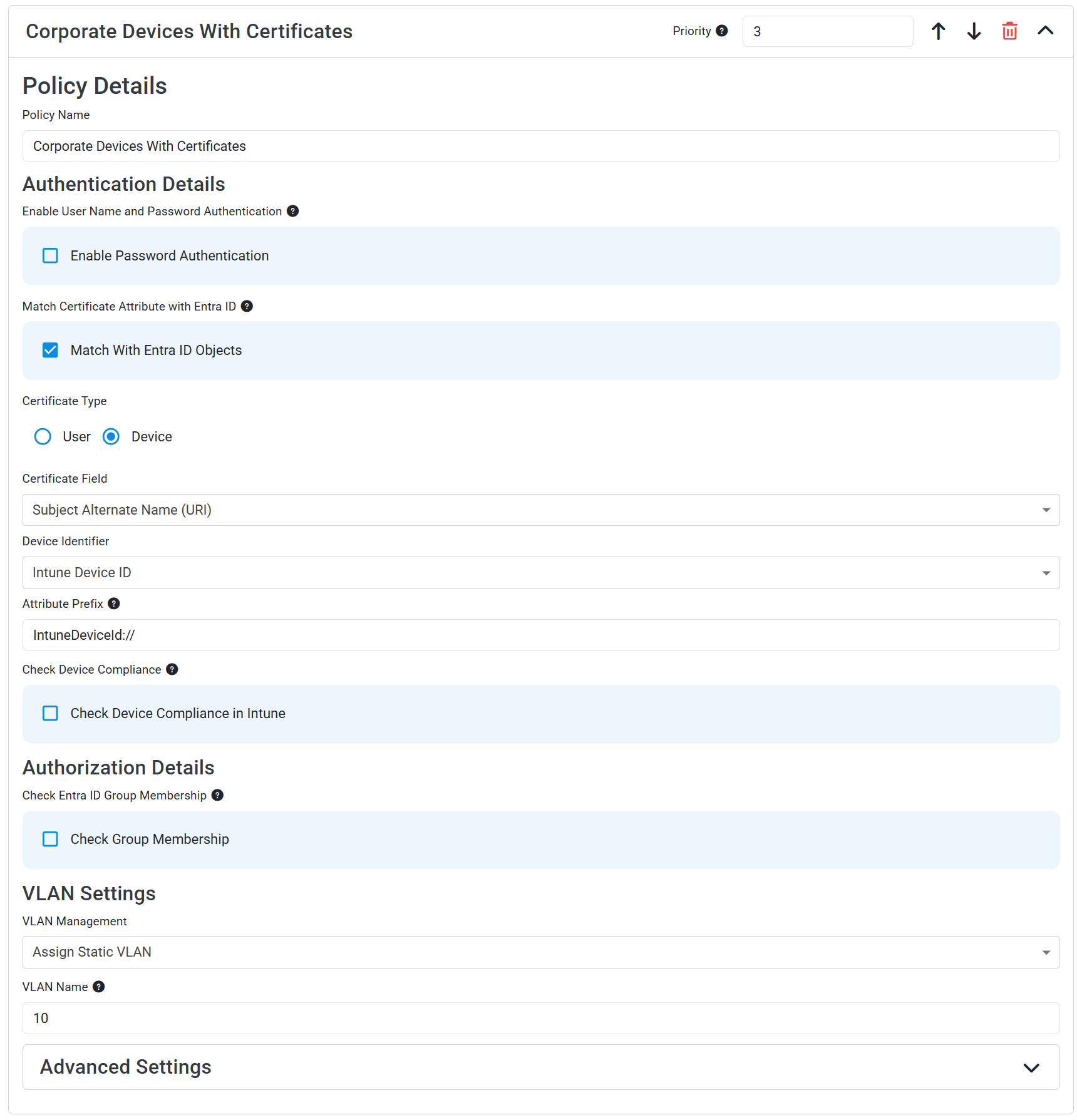
Corporate-Owned Devices Policy: This policy would require certificate-based authentication (EAP-TLS) and would be configured to place devices in the corporate VLAN. This policy could also validate the user/device against Entra ID or Intune for additional security checks if desired.
-
BYOD Devices Policy: This policy would allow Entra ID authentication (EAP-TTLS) and would be configured to place devices in the BYOD VLAN.
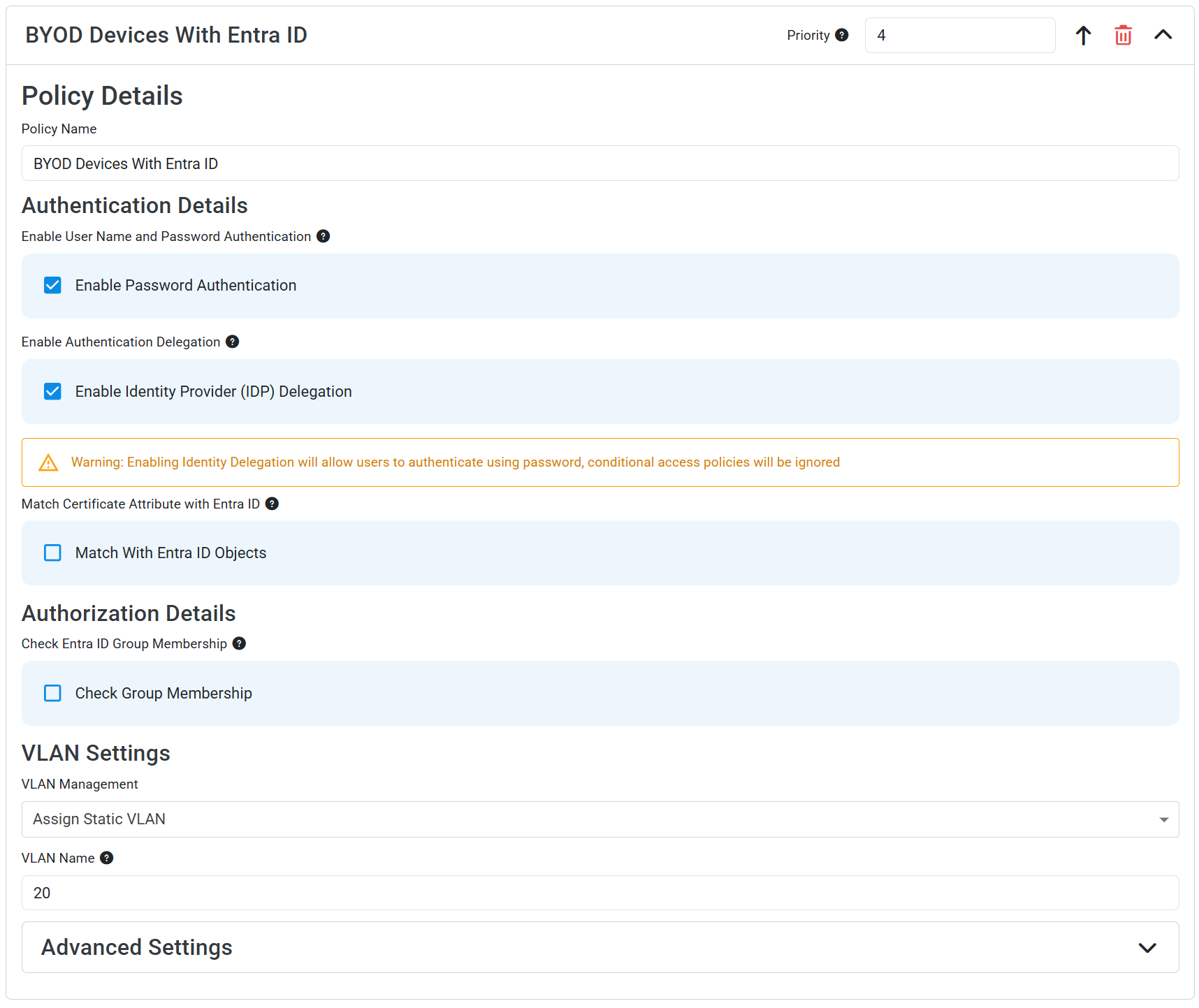
The order of these access policies is not important as long as the conditions are set correctly, since one policy is looking for certificate-based authentication and the other is looking for Entra ID authentication. Devices that authenticate with a certificate will match the corporate-owned policy and be placed in the corporate VLAN, while devices that authenticate with Entra ID will match the BYOD policy and be placed in the BYOD VLAN.
For both your corporate-owned and BYOD devices, make sure to push Wi-Fi profiles via a Mobile Device Management (MDM) solution like Microsoft Intune or via EZRADIUS self-service Wi-Fi profiles so that devices are configured to use the correct authentication method. Most devices are not able to connect to a WPA Enterprise network without an explicitly configured Wi-Fi profile. Refer to our Wi-Fi profile distribution docs for more information on how to distribute Wi-Fi profiles to your devices.