






How-To: Register EZCA Intune App
In order to use EZCA for Intune Certificate Management, the Keytos Intune Application must be registered in your tenant. Once this is enabled, EZCA will connect to Intune
Solutions

One platform. Zero passwords.

Cloud PKI for Azure, Intune, and Entra ID

The best cloud RADIUS for Microsoft environments

Entra ID authentication to SSH endpoints

Passwordless authentication onboarding for Entra ID

SSL certificate monitoring tool
Blog
Partner

Your trusted partner for passwordless security
Join our global partner network
Microsoft Intune is a powerful mobile device management (MDM) solution that allows you to manage your Windows, macOS, iOS, and Android devices. One of the configuration options available in Intune is the ability to automatically issue SCEP certificates to your managed devices. These user and/or device certificates can be used for a variety of purposes, including Wi-Fi authentication, VPN access, and email encryption.
EZCA is one of the few trusted Microsoft Intune SCEP solutions that is fully integrated with Microsoft Intune, allowing you to easily set up and issue SCEP certificates to your devices without the need for complex configurations or additional infrastructure.
Want to get started issuing SCEP certificates to your Intune-managed devices? Follow our guides to get up and running in minutes.
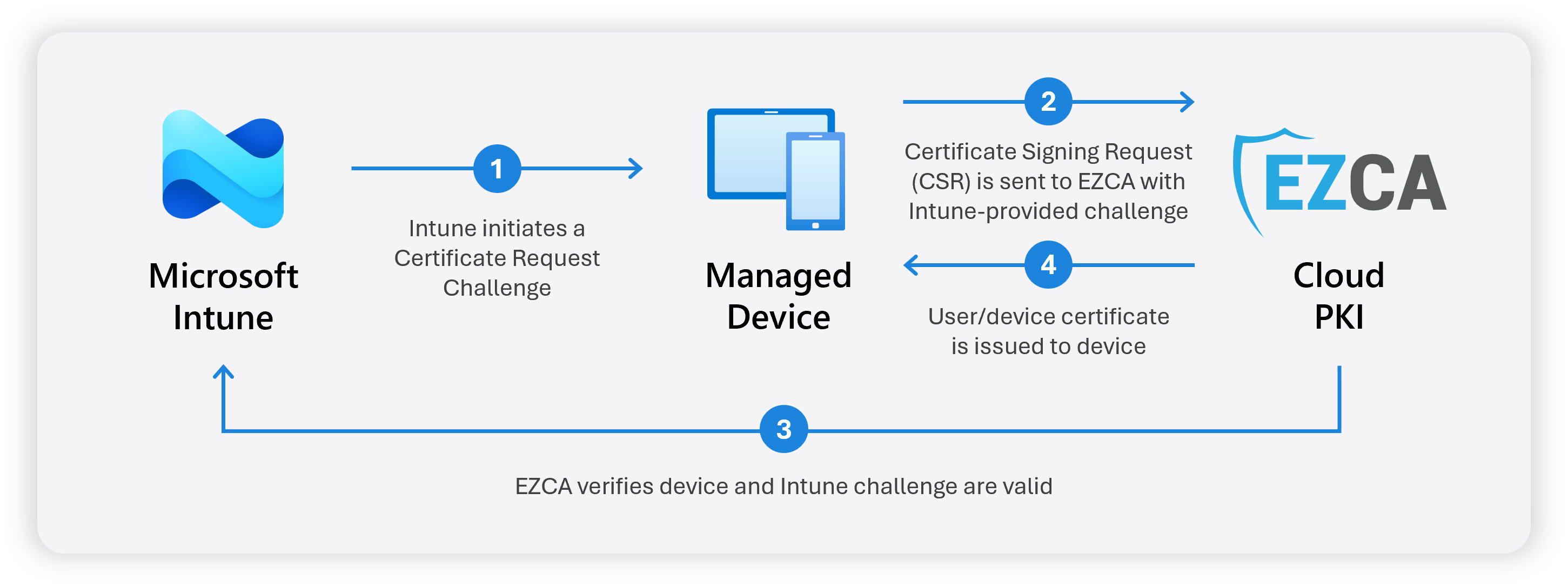
🚀 Begin Issuing SCEP Certificates in IntuneWhen you are ready to begin issuing SCEP certificates to your Microsoft Intune-managed devices, you will first need to install, or “consent” to the EZCA Intune application. This allows EZCA to issue and manage certificates to your Intune-managed devices. Additionally, it allows EZCA to automatically revoke and renew certificates as needed, ensuring that your devices always have valid certificates for secure access.
Yes! With EZCA and Microsoft Intune you are in control of the types of certificates you issue to your managed users and devices, along with all of the configuration options that meet your security and compliance needs. You can choose to issue user certificates, device certificates, or both, depending on your organization’s requirements.
Yes! EZCA’s integration with Microsoft Intune allows for automatic certificate renewal. When a certificate is nearing its expiration date, EZCA will automatically issue a new certificate to the device, ensuring that there is no disruption in service and that your devices always have valid certificates for secure access.
Yes! When a device is retired or removed from Microsoft Intune, EZCA will automatically revoke any certificates that were issued to that device. This ensures that only active and compliant devices have access to your network and resources, enhancing your organization’s security posture.
Follow these guides to set up Microsoft Intune to issue SCEP certificates to your managed devices:
In order to use EZCA for Intune Certificate Management, the Keytos Intune Application must be registered in your tenant. Once this is enabled, EZCA will connect to Intune
Learn how to create a SCEP CA for Microsoft Intune in EZCA and issue certificates to Intune managed devices.
In this section we will guide you on how to create an Intune profile to issue X509 certificates using SCEP for Windows, MacOS, Android and iOS.
Learn how to set up Hybrid Windows Hello for Business using EZCA Cloud PKI — no ADCS required. Covers trusting your CA in Active Directory, issuing domain controller certificates, and deploying user certificates for RDP sign-in.
Intune SCEP profiles allow you to issue certificates for all your devices on behalf of your users, enabling scenarios such as X509 authentication to Wi-Fi, VPN, and more. Learn how Intune SCEP certificate issuance works with EZCA and how to set it up for your organization.
Intune SCEP does not give you a lot of information when things go wrong, this page will help you troubleshoot the most common issues with Intune SCEP Certificate Issuance.