










How To Distribute Keytos Shield Network Profiles to Your Devices via Mobile Device Management (MDM)
How Do I Connect My Devices to an Enterprise 802.1X Network Using RADIUS Authentication?
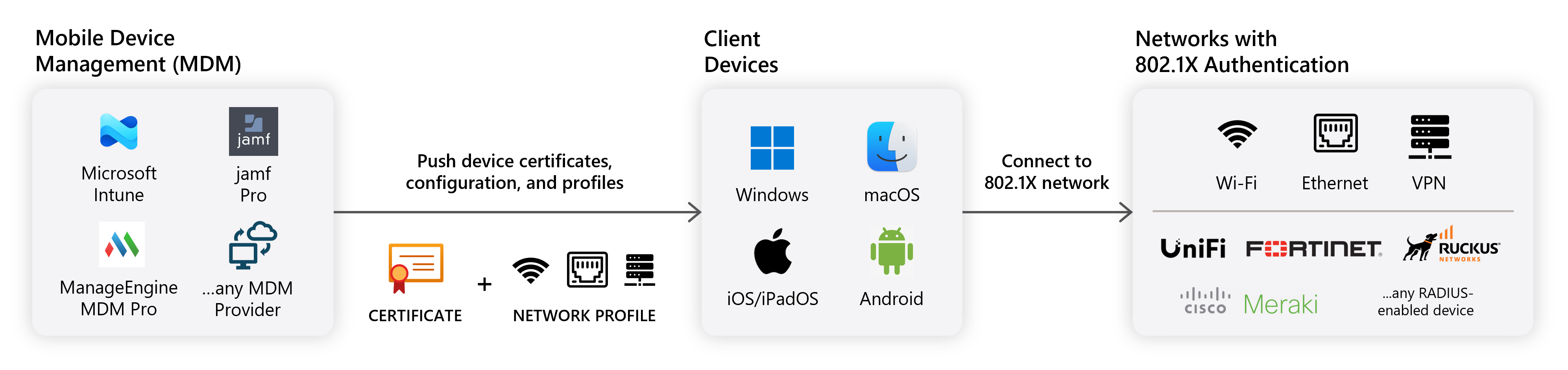
Connecting to an enterprise 802.1X network isn’t as easy as just clicking on the Wi-Fi network and connecting, even if you have the right credentials. Enterprise networks require that certificates and network profiles be distributed to end-devices in order to connect securely to the network using RADIUS authentication. For most organizations, this is done using a Mobile Device Management (MDM) solution like Microsoft Intune or Jamf Pro.
What are the Prerequisites Before I Can Push Network Profiles to My Users?
Before you can push network profiles to your users, ensure you have completed the following:
- Register the Keytos applications in your tenant
- Create a Keytos Shield subscription
- Add your Subscription Owners or Network Administrators
What Mobile Device Management (MDM) Solutions Can I Use to Push Network Profiles to My Users?
While Keytos Shield supports any Mobile Device Management (MDM) solution that can push certificates and network profiles to your devices, we have tailored guides for the following MDM solutions:
Can I Connect Non-Managed Devices to My Enterprise Network Using RADIUS Authentication?
Yes! If you only have a few devices to connect, you can also manually configure your devices without the need of an MDM or the Self-Service Wi-Fi portal.