














Protect Your Identities with Keytos Shield
Keytos Shield gives every user a phishing-resistant FIDO2 security key backed by a fully managed cloud PKI. Learn how to protect your identities and go passwordless with Shield.
Overview - What is Keytos Shield Identity Security?
Keytos Shield protects your identities by giving every user a phishing-resistant security key which contains both a FIDO2 passkey and certificates for Entra CBA, backed by a fully managed cloud PKI. Shield handles security key enrollment, identity verification, and certificate issuance for you, so you can go passwordless without any servers or on-premises infrastructure.
What’s on the Keytos Shield Identity Security Dashboard?
The identity security Dashboard gives you a quick view of what needs your attention: requests waiting on you, how many spare security keys you have left, and how many users have onboarded. To open it, sign in to your Shield portal and, from the left-hand menu, expand Identity security and click Dashboard.
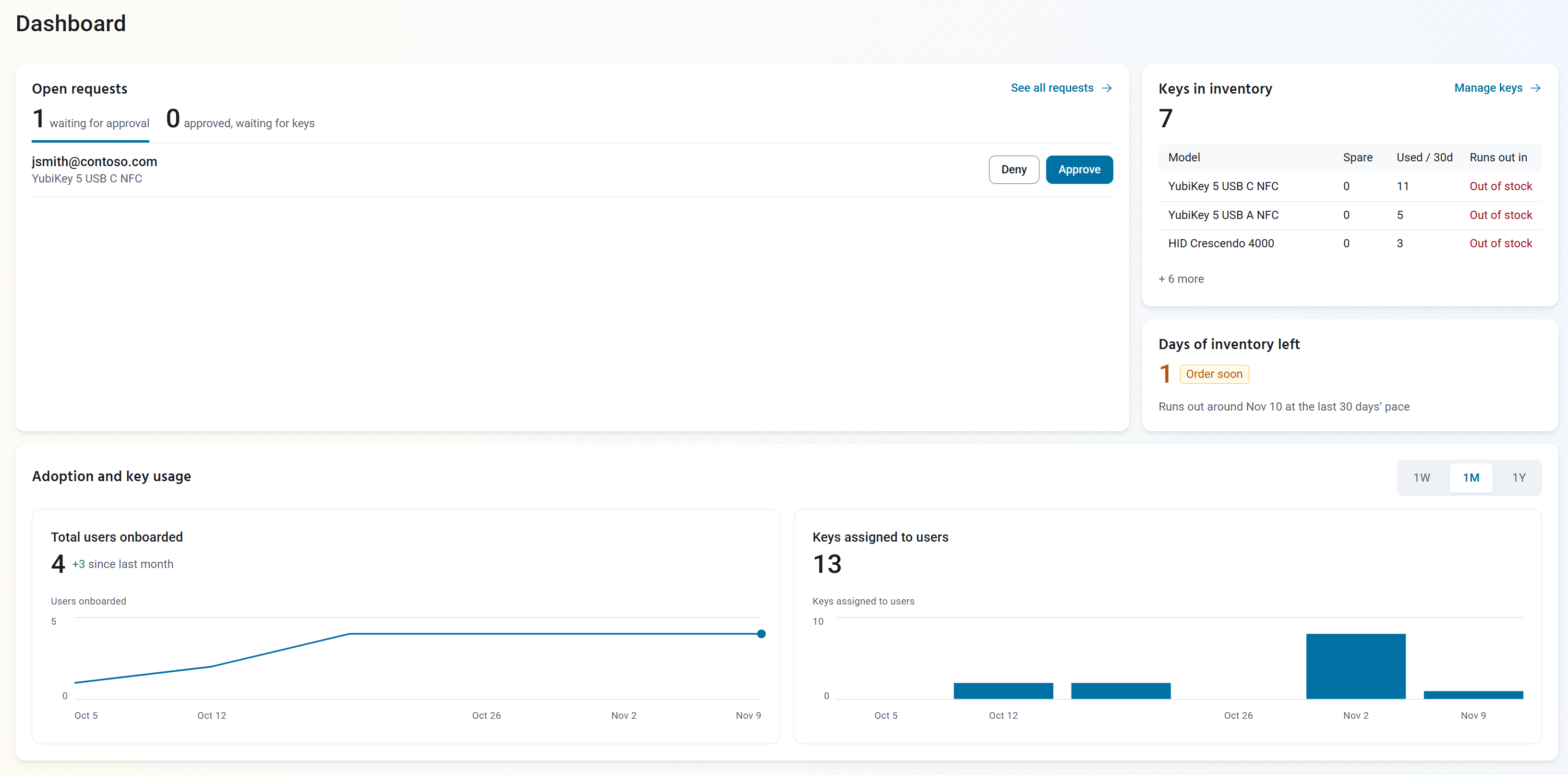
The dashboard has four sections:
- Open requests: Security key requests that need action. The counts show how many are waiting for approval and how many are approved, waiting for keys. Click Approve or Deny to review a request right from the dashboard, or click See all requests to fulfill requests.
- Keys in inventory: The number of security keys in your inventory, with the Spare keys, keys Used / 30d, and when each model Runs out in. Click Manage keys to manage your security key inventory.
- Days of inventory left: How long your spare keys will last at the last 30 days’ pace. When you’re about to run out, it shows Order soon.
- Adoption and key usage: Charts of Total users onboarded and Keys assigned to users over time. Click 1W, 1M, or 1Y to change the time range.
How to Manage Keytos Shield Identity Security
| I want to… | Guide |
|---|---|
| Onboard my organization to Shield identity security | Get started with Keytos Shield identity security |
| Change onboarding domains, enrollment and recovery, smart card, certificate, or alternative account settings | Manage identity settings |
| Approve requests and assign security keys to users | Fulfill security key requests |
| Install a user’s identity on their security key before shipping it | Bootstrap security keys |
| Approve a user’s request to unblock their security key | Approve unblock requests |
| Register, find, and delete security keys in my inventory | Manage your security key inventory |
| Audit security key, certificate, passkey, and ID verification activity | View identity logs |
| Let users sign in to Entra ID with the smart card certificate on their security key | Configure Entra ID certificate-based authentication |
| Let users sign in to Entra ID with the FIDO2 passkey on their security key | Configure FIDO2 passkeys in Entra ID |